There is a published rule for when a team should move an agent from Copilot Studio to Microsoft Foundry. The rule ends with a two-week prototype, and what Foundry asks for in return is an engineering team.
If you only have a minute:
- The decision starts one question earlier than "Studio or Foundry." It asks whether a ready-made agent already inside a Microsoft product does the job. Building anything is the step after that.
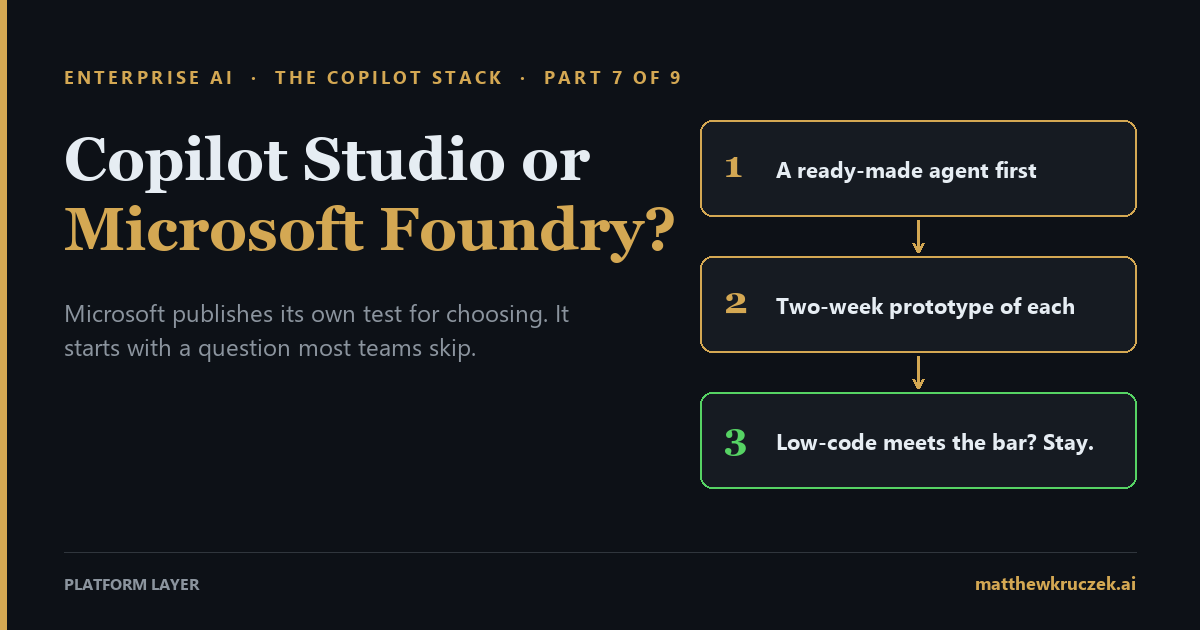
- Then it says to prototype both and keep the simpler one if it passes. One to two weeks per option, judged on development speed, functional coverage, and integration complexity. If the low-code prototype meets the functional and security requirements, the team proceeds with it.
- Foundry is the workshop for teams that build agents themselves. It was called Azure AI Foundry until recently. Microsoft can run an agent from plain-language settings or run code your developers write, or your company can run that code itself and borrow Foundry's models.
- What Foundry inherits is an engineering organization. A senior owner for the company's Azure account, services the company sets up and secures, monitoring, developers, and a platform team. No headcount figure is published.
- Work IQ is a shared service, available to both platforms. It lets software reach the Microsoft 365 data an employee can already see, bills in Copilot Credits with no per-user license, and its connections to Studio and Foundry are labeled preview.
- The cost is mostly people, and one license sits outside both platforms. As of October 15, no dollar rates are published for hosted-agent computing or tool charges, so this post gives no Foundry dollar figure. Since July 1, security features for both Studio and Foundry agents require an Agent 365 license.
Part 6 ended with an agent that works. An employee asks where their expense reimbursement is, the agent checks the finance system, and it answers: pending, awaiting manager approval, eleven days. The finance team built it in Copilot Studio without writing code, and it has a named owner.
Three months in, the wish list arrives. The team wants the agent to read the invoices themselves, reach into three internal systems rather than one, and pass a nightly test that checks its answers against a set of known-correct ones. And the team's own developers want to build it in code, the way they build everything else.
Is that still Copilot Studio's job, or has it become Microsoft Foundry's?
Foundry is where a company stops assembling an agent from parts Microsoft supplies and starts building one with its own developers. The trade is more control in exchange for an engineering organization to run it. The rule is to make that trade only after a Studio prototype has failed to meet the functional and security requirements.
What it actually is
Microsoft Foundry is Microsoft's platform for teams that build AI agents themselves. It was called Azure AI Foundry until recently, and some older pages still use that name.
The simplest way to understand it is to ask who runs the finished agent. There are four ways to build one, and the expense-status agent could be rebuilt any of the four ways.
Microsoft runs it, from settings. A finance analyst writes the agent's instructions in plain English, picks an AI model, and chooses the tools the agent is allowed to use. There is no code and nothing to host. This is a prompt agent.
Microsoft runs it, for spoken conversations. The same idea, for an employee who speaks rather than types. The team sets the model, the instructions, and the audio options, and Microsoft handles the speech. This is a voice agent, and it is in preview.
Microsoft runs your code. The team's developers write the agent's logic themselves, using a code toolkit. Microsoft's own toolkit is Microsoft Agent Framework, and Foundry also accepts others, including LangGraph and the OpenAI and Anthropic agent kits. Foundry then runs that code on Microsoft's servers. Each agent gets its own identity in the company's directory, the way a new employee gets an account, and an address other systems can call. This is a hosted agent.
You run your code. The developers write similar code, but the company runs it on its own servers or in another cloud. Foundry supplies the AI models and the tools and keeps no record of the agent itself. This is an ephemeral agent: the agent lives inside the company's own application.
The first two need no developers. The last two do, and the last one also means the company operates the agent itself.
The trade between the two
The choice comes down to a trade between letting Microsoft run the agent and writing it in code.
Letting Microsoft run the agent is fast, and the security comes built in, but the team gets less say over how the agent behaves. The planning term for this is managed orchestration: it accelerates deployment and provides built-in security but limits customization.
Writing the agent in code gives the team control over everything, including where it runs, and the bill for that control is engineers. Code-first frameworks, such as Microsoft Agent Framework or LangGraph, offer granular control and multicloud flexibility, but they require significant engineering investment and ongoing maintenance.
Two things Studio can already do
Two items on the wish list do not require leaving Studio.
If the team wants a different AI model, Studio can already use models from Foundry's catalog of more than 1,800. If one piece of the job needs real code, say the invoice reading, the developers can build that piece as a Foundry agent and have the Studio agent hand off to it. That connection to a Foundry agent is still in preview.
That gives the team three candidates: stay in Studio, rebuild in Foundry, or stay in Studio and bolt one Foundry piece on.
Where Work IQ fits
Say the team also wants the agent to find the receipt an employee attached to an email last month. That receipt is Microsoft 365 data, and Work IQ is the service Microsoft built to hand that kind of data to software.
Work IQ is easy to confuse with Microsoft 365 Copilot. Microsoft 365 Copilot is what an employee uses: a person opens it in Word, Teams, or Outlook, asks it questions, and each user needs a license. Work IQ is what software uses. A developer's agent calls it to reach the same email, files, and meetings, and Microsoft bills that use in Copilot Credits with no per-user license.
It lets agents read and act on Microsoft 365 data with permissions respected. Acting includes sending an email or scheduling a meeting. It runs as the signed-in user, so an agent can see what that person can see, and nothing more.
Any agent can use it, whether built in Studio, in Foundry, or by another vendor. It is a shared service rather than a step up from either platform.
The billing sits apart from both platforms' own charges. There is no separate Work IQ subscription, product code, or per-user license. An action, such as sending an email, costs a flat 0.1 Copilot Credit. Questions that search and reason over company data carry a variable charge, and no per-question figure is published. The sample usage scenarios are illustrative. To use it, a company needs a usage-based billing plan set up in Copilot Studio, and a Global Administrator, the top administrator role in Microsoft 365, has to complete a one-time setup step.
What to do first
The decision tree for AI agents starts with one question: does a ready-made agent meet your functional requirements?
Ready-made means the agents already inside Microsoft's products: Microsoft 365 Copilot, GitHub Copilot, Fabric, Dynamics 365, Security Copilot, and Azure, which is most of Parts 1 through 5 of this series. If one of those fits, adopt it. Only when none fits does the tree say to build, and then it offers three places to do that: Foundry, Copilot Studio, or the company's own infrastructure.
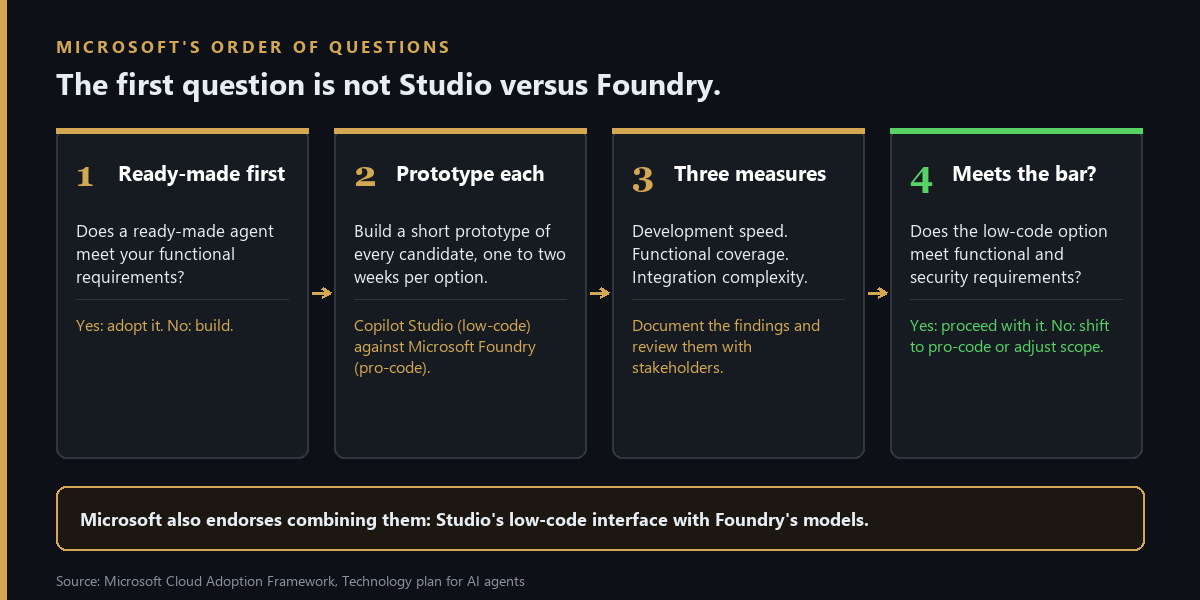
Each has a best use. Copilot Studio is for process transformation, with fast development and minimal coding. Foundry is for strategic transformation, with deep integration and custom logic. The company's own infrastructure is for compliance-sensitive or highly customized work.
Then comes the procedure for choosing between the two. Build a short prototype of each candidate, one to two weeks per option. Compare Studio's low-code agents, the kind a business team assembles with visual tools, against Foundry's pro-code agents, the kind developers write. Judge them on development speed, functional coverage, and integration complexity. Then apply the rule: if a low-code solution meets the functional and security requirements, proceed with it. If not, shift to pro-code or adjust the scope.
The two can also be combined, Studio's low-code interface with Foundry's models, which is the third candidate from the section above.
For the expense-status team, the test turns a debate into a calendar. Two weeks in Studio, two weeks in Foundry, the same wish list, and one question at the end: did the Studio version meet the functional and security requirements? If it did, the team stays. If it failed one of the four items, that item, written down, is what justifies Foundry.
What it inherits
Part 6 found that Copilot Studio inherits a documented process. An agent can only automate something that already exists in writing, exceptions included. Foundry inherits something larger: an engineering organization.
In practice it means five things.
An owner for the Azure account. Whoever creates the Foundry account needs a senior role over the company's Azure subscription, called Foundry Account Owner. Building agents inside it takes a separate, narrower permission, Foundry User. The senior role can create accounts and projects but cannot build inside one. The person who sets Foundry up and the person who builds on it need two separate approvals.
Services the company supplies and secures. The standard setup uses three Azure services the company provides itself: a database, a search service, and file storage. Whoever sets them up needs permission to grant access on each. A basic setup skips all three and is faster, but it has no private network isolation. Keeping agent traffic on a private network requires the standard setup and a private network of the company's own.
Monitoring. Watching how agents behave means connecting Azure's monitoring service, Application Insights, to the Foundry project. It has its own access permissions, and so do the logs behind it. Some of these features are preview.
Skills. The advice is to retrain existing staff where feasible, such as upskilling web developers for Copilot Studio, and to bring in specialists such as machine learning engineers for complex Foundry projects. The skill areas include writing instructions for AI models, checking an agent's answers against known-correct ones, preparing data, and defending against prompt injection, where hidden text in a document or message tries to hijack an agent. The nightly test on the team's wish list is the second of those skills, and someone has to own it.
An operating model. The model is a platform team that manages the technical foundation and guardrails, workload teams that build on it, and an AI center of excellence. Without these, organizations risk isolated experiments, inconsistent security practices, and an inability to scale.
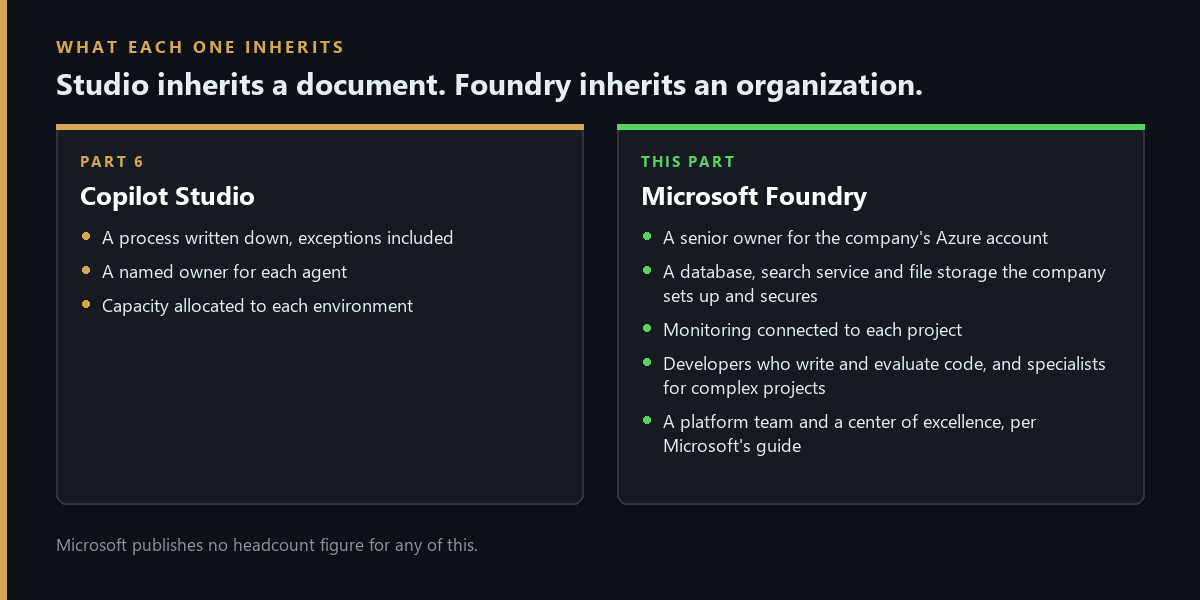
No headcount figure is published anywhere. For a company that already has an Azure platform team and developers who write and test software for a living, the list above describes work those people already do. For a company without one, it is a hiring plan.
What it costs
Studio bills in Copilot Credits, as Part 6 covered. Foundry bills in ordinary Azure usage charges, which break down this way.
- The agent itself: no additional charge for creating or running Foundry-native agents built with prompts and workflows.
- The AI model: billed in tokens, the small chunks of text a model reads and writes, through Foundry's model pricing.
- Connected services: their own charges and licenses. Examples include SharePoint and Azure Logic Apps connectors, its ready-made connections to other systems.
- Hosted agents: billed for the computing capacity they use, by the hour.
- Built-in tools: such as file search and code execution, each with its own charge.
As of October 15, the dollar rates for hosted-agent computing and for each built-in tool were blank on Microsoft's page, shown as placeholders. Model token prices live on a separate page. No Foundry dollar figure appears in this post for that reason.
The portal's cost estimate also leaves out prompt agents and agents built outside Foundry, and charging spend back to a specific project is still in preview. Work IQ calls from either platform bill in Copilot Credits, as covered above.
One cost sits outside both platforms. Since July 1, 2026, the agent security capabilities for Copilot Studio and Foundry agents require an Agent 365 license. Those capabilities include agent discovery, threat detection, and real-time protection. Giving a Foundry agent its own account inside Microsoft 365, called an autopilot, also requires enrollment in Microsoft's Frontier preview program and one license for each agent instance.
The largest cost is the one no pricing page lists: the people in the section above.
The verdict, in fit terms
The verdict follows the order of the questions above.
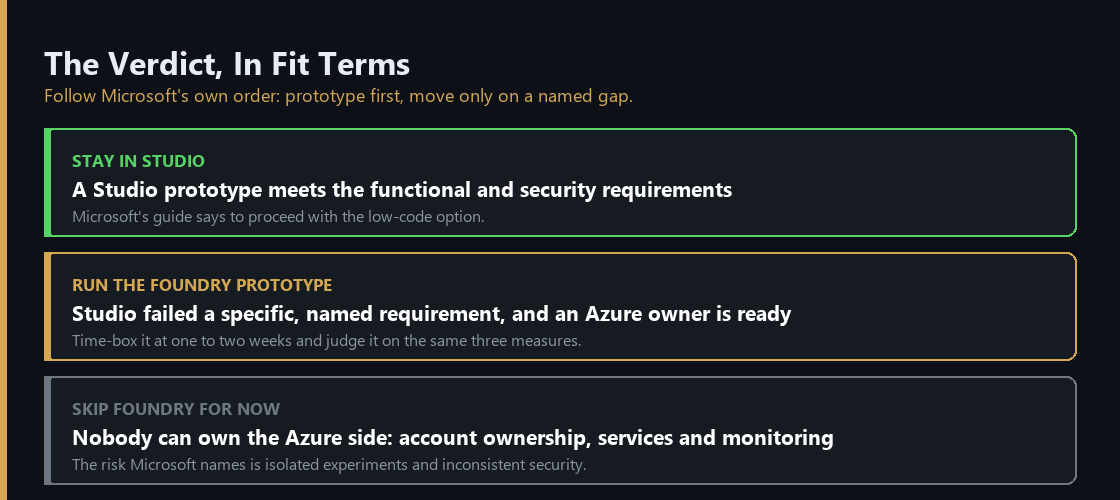
Stay in Studio if a Studio prototype meets the functional and security requirements. An agent in the Part 6 shape, a documented process and a named owner, starts here and stays here until the two-week prototype shows otherwise.
Run the Foundry prototype if the Studio prototype failed a specific, named requirement, and a team that can own the Azure side is ready to run the other half of the experiment. Judge it on the same three measures.
Skip Foundry for now if nobody can own the Azure side: the account, the services, the monitoring. The risk is isolated experiments and inconsistent security practices.
The Monday checklist
Four things an IT or platform lead can check this week.
- Write down the requirement Studio failed. One sentence. If it cannot be stated that way, the team may be working from an assumption about Studio's limits rather than a test of them.
- Time-box both prototypes. One to two weeks each, judged on development speed, functional coverage, and integration complexity, the three measures of the test.
- Name the Azure owner before the Foundry prototype starts. Find out who holds the senior role over the subscription, and who would own the database, search, and storage services the standard setup requires.
- Check Agent 365 licensing. Since July 1, security capabilities for both Studio and Foundry agents depend on it, and the answer changes what either platform costs to run.
What comes next
Part 8 covers Agent 365 and Microsoft Entra Agent ID: how a company finds the agents it already has, including the ones nobody registered, and what to buy in what order.
Product capabilities, licensing terms, and pricing in this post were verified against Microsoft's own documentation on 13 and 15 October 2026. Foundry meter rates and Work IQ per-question costs could not be confirmed and are marked above. Microsoft is still renaming and repricing parts of this stack, so confirm current terms before committing to a purchase.
Matthew Kruczek is Managing Director at EY, leading Microsoft domain initiatives within Digital Engineering. Connect with Matthew on LinkedIn to discuss how your organization should approach the Copilot portfolio.
References
- Microsoft Learn, Cloud Adoption Framework, "Technology plan for AI agents." The decision tree, the best-for labels, the one-to-two-week prototype procedure, and the hybrid approach.
- Microsoft Learn, Cloud Adoption Framework, "Build and secure AI agents" and "Organizational readiness for AI agents." The managed versus code-first tradeoff, skills, and the platform team, workload team, and center of excellence model.
- Microsoft Learn, "What is Microsoft Foundry" and "Foundry Agent Service overview." The rename, build paths, and platform components.
- Microsoft Learn, "Set up your environment" and Foundry role-based access control and administrator guides. The account owner role, the services a company supplies itself, basic versus standard setup, and the split between setting up and building.
- Microsoft Learn, "Monitor agents in Foundry." Application Insights and access prerequisites.
- Microsoft Azure, "Foundry Agent Service pricing," and Microsoft Learn, "Manage costs in Foundry." The meter structure, placeholder rates, and the cost view limits.
- Microsoft Learn, Work IQ overview, API overview, and "Enable Work IQ," and Microsoft 365 blog, "Announcing the new Work IQ APIs," June 2, 2026. The API groups, delegated access, and setup requirements.
- Microsoft Licensing, "Work IQ general availability." Copilot Credit billing and the 0.1 credit tool call.
- Microsoft Learn, Copilot Studio, "Use Work IQ (preview)," "Bring your own model for prompts," and "Connect to a Microsoft Foundry agent (preview)." The preview status and how Studio reaches Foundry models and agents.
- Microsoft Learn, Defender, "Transition agent security to Agent 365," and Foundry, "Quickstart: Build your first autopilot." The July 1, 2026 license requirement, Frontier enrollment, and per-instance license.