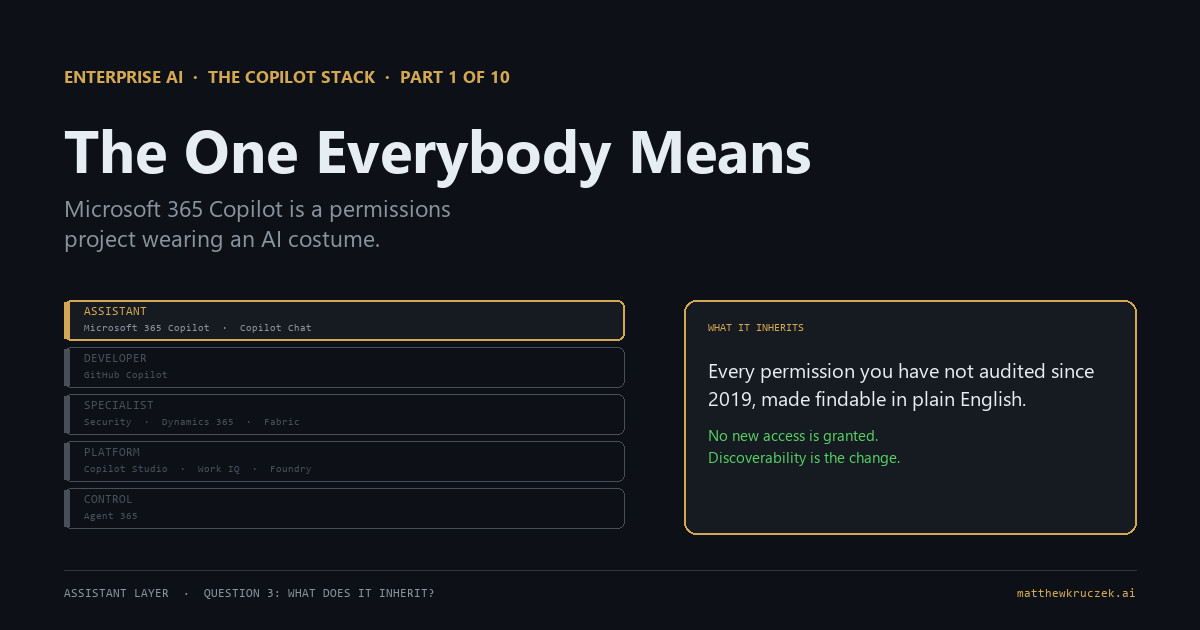
Microsoft 365 Copilot grants nobody access to anything they could not already open. That is true, it is the vendor's position, and it is the single most misread sentence in this whole category. What changes is not who can reach the finance folder. It is that finding it no longer requires knowing it exists.
If you only have a minute:
- It is a permissions project wearing an AI costume. The capability is genuinely good. Whether it works in your tenant is decided by SharePoint hygiene you have been deferring since about 2019.
- Discoverability is the risk, not exposure. Copilot honors every permission you have. The company-wide folder that was safe because nobody knew the path stops being safe when anyone can ask for it in plain English.
- Microsoft's own deployment blueprint puts "Remediate oversharing" first. It is step one of three, and it is written to happen before licenses are assigned.
- The cleanup tooling comes with the license. SharePoint Advanced Management is included with Microsoft 365 Copilot, so the remediation costs attention rather than another purchase order.
- There is a pause button, and it has a cost. Restricted Content Discovery hides a site from Copilot without touching its permissions. Microsoft's own documentation cautions that using it heavily degrades the answers.
- A prerequisite that quietly disqualifies people: the user's primary mailbox has to be in Exchange Online. Hybrid and on-premises mailboxes do not ground.
- Buy it when the tenant is ready, not when the budget cycle is. A rollout onto unremediated SharePoint is the most reliable way to produce a disappointing pilot.
Part 0 argued that Copilot is a brand across roughly a dozen products in five layers. This is the one at the top of the assistant layer, and it is what nine out of ten people mean when they say the word with no qualifier. It is also where most organizations spend their first real money.
What it actually is
Strip the branding and Microsoft 365 Copilot is two things fused together.
The first is a chat assistant inside Word, Excel, PowerPoint, Outlook, and Teams. It drafts, summarizes, rewrites, and answers questions in the app you already have open.
The second is the part that matters, and it is a retrieval system over your organization's content. It reasons across the files, email, chats, meetings, and calendar the signed-in user can already reach, plus third-party systems connected through Copilot connectors. Ask it to summarize where the Henderson deal stands and it goes looking through mail, Teams threads, and the deck somebody revised on Thursday.
Take away the second half and you have a writing assistant, which is close to what the free tier is. The organizational grounding is the product. Everything difficult about deploying Copilot follows from the fact that it reads your company's content, which means it is only ever as good as the state that content is in.
What job it does on an ordinary Tuesday
The keynote demo is a director building a board summary from four documents she never opened. That happens, and it is real, and it is not the median use.
The median use is smaller and duller. Somebody comes back from three days out and asks what happened in a Teams channel. Somebody who was double-booked asks what was decided in the meeting they missed. Somebody writes the first draft of a status update from a project plan and four email threads. A manager pulls a summary of what their team shipped last month for a review they forgot was today.
None of that is a board summary. Those uses share a shape worth noticing when you plan a rollout. They are all retrieval and synthesis over work that already exists, they save between two minutes and forty, and none of them is memorable enough that the person would report it on a survey. That mismatch is why Copilot pilots often measure as underwhelming while the people in them quietly keep using it. The value shows up as an absence, and absences do not survey well.
What it inherits
This is the section that decides your outcome, and the third question of the five carries almost the whole post.
Discoverability, not exposure
Two claims that both need to be true in your head at once.
Copilot grants no new access. It honors every permission, sensitivity label, and access control already in place, and it returns only what the signed-in user could already open. Criticism that skips this is wrong, and it is worth correcting because it is common.
And: a permission model nobody has audited in six years, which was survivable when finding a document required knowing where it lived, becomes a different thing when a natural-language question can find it. The finance folder shared with "everyone except external users" in 2019 was technically open the entire time. It was protected by the fact that no one would ever have guessed to look. Copilot removes that protection without changing a single permission.
The exposure was always there. What Copilot changes is whether anyone can find it by asking.
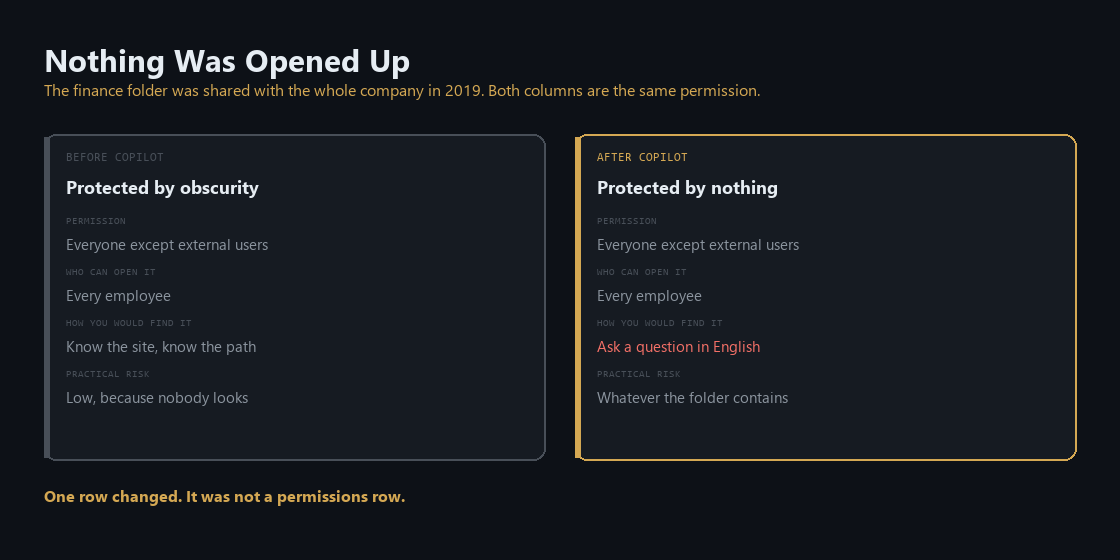
That reframing matters because it tells you what the fix is. You are not securing Copilot. You are fixing an access model that has been wrong for years and was never load-bearing until now.
Microsoft's guidance says to do this first
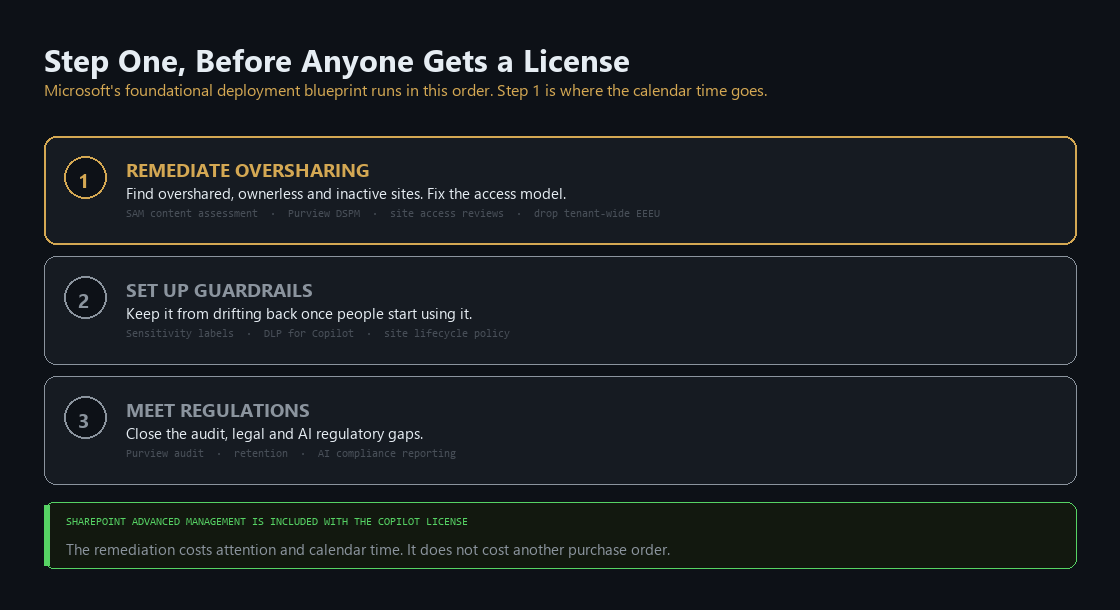
The foundational deployment blueprint for Microsoft 365 Copilot is organized into three pillars, in order: remediate oversharing, set up guardrails, meet regulations. Step one is the cleanup, and the guidance is written for it to happen before people get licenses.
The work it describes is unglamorous and specific. Run the SharePoint Advanced Management content management assessment to find sites with oversized audiences, broken permission inheritance, "everyone except external users" grants, and sites that are inactive or have no owner at all. Cross-reference that against Purview data security posture management assessments to find where the sensitive content sits. The overlap is your work queue. Send site access reviews to the owners so the people who understand the content decide who should have it, because a central team cannot make that call for four hundred sites and should not try. Turn off tenant-level "everyone except external users." Give ownerless sites an owner. Archive what nobody has opened in years, which improves answers as much as it reduces risk.
Two practical notes on the tooling, because they change the budget conversation.
SharePoint Advanced Management is included with the Microsoft 365 Copilot license. The permission reports, access reviews, and content discovery controls that the blueprint depends on come with the thing you are buying. If a proposal arrives with a separate line item for oversharing remediation tooling, check it against what the license already covers. Organizations with A3, E3, or G3 also get a foundational set of these controls in Purview and SharePoint Advanced Management before any Copilot license is involved.
There is a pause button, and it is called Restricted Content Discovery. Turn it on for a site and that site stops appearing in organization-wide search and Copilot responses, and the AI entry points disappear from it. Permissions are untouched, the content stays in the index, and anyone who already had access keeps it. It is designed as a temporary control that buys you time to review a site properly while the rest of the rollout continues.
Read the caution that ships with it, because it is the most useful sentence in the documentation. Microsoft warns that excessive use reduces the content available to search and Copilot, which affects the completeness and relevance of answers. A tenant that restricts its way to safety produces an assistant that confidently does not know things, and the people using it will conclude the product is weak rather than that the configuration is. Restricted Content Discovery is a scalpel with a stated cost. Treat a long restricted list as a signal that the remediation is behind, not as a finished state.
A related setting, Restricted SharePoint Search, works the opposite way: an allowed list of sites you have already checked. It is off by default with an empty list. Starting there is defensible for a cautious first phase and it has the same failure mode at scale.
The prerequisite that catches people
One inheritance rarely mentioned in a buying conversation: the user's primary mailbox must be in Exchange Online. Mailbox content is part of what Copilot reasons over, and on-premises and hybrid mailboxes do not support that grounding.
If you are a company that has been most of the way through a mail migration for three years, this is worth checking before you count seats. It does not stop the apps from working. It removes a meaningful part of what makes the product useful for exactly the users you probably meant to prioritize.
What it takes to run
The owner is IT, usually with security holding a real veto, and the skills are more SharePoint governance than machine learning. Nobody on this project needs to know what a token is. Somebody needs to know who owns the legal team's document library and whether that person still works here.
Be honest with your sponsor about the shape of the remediation, because it is the part that gets estimated worst. The assessments run in hours. Reading them takes days. The actual fix is a campaign of chasing site owners across the business for decisions only they can make, and a meaningful number of those owners have left, changed roles, or will ignore three emails before answering. That is calendar time rather than effort, and it does not compress by adding people. Organizations that treat it as a technical task staffed by two administrators discover the bottleneck is entirely social. Scope it as an internal campaign with executive air cover and it moves. Scope it as a ticket and it sits.
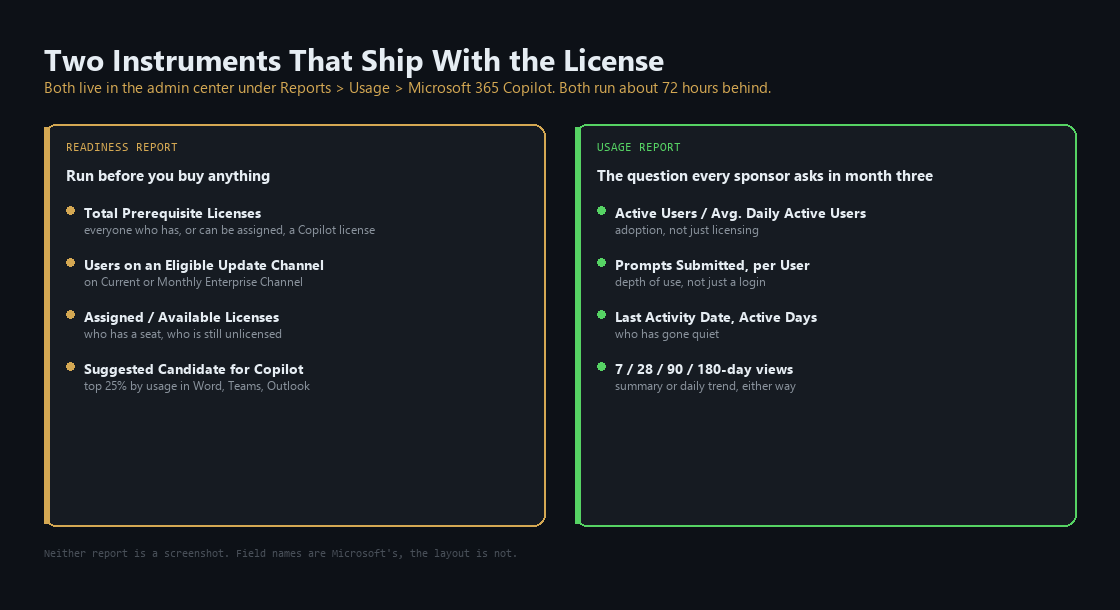
Two instruments come with the product and are worth knowing before you commit.
The readiness report in the admin center tells you which users are technically eligible, how much they use the apps Copilot integrates with, and where the technical blockers are. Run it before you buy anything. A user who has not opened Word in four months is not the pilot candidate their job title suggests.
The usage report answers the question every sponsor asks in month three, which is whether the people you licensed are using it. It shows adoption and retention, breaks activity down by app, and identifies users who have not touched Copilot in the last 28 days. Both reports run about 72 hours behind. There is a built-in organizational messages feature that nudges inactive users in the flow of work, which is more effective than another all-hands slide.
Activation is the second problem, and it only becomes the top one once the data is clean. A person who tries Copilot on a tenant where it returns four stale versions of the pricing deck learns in one afternoon that it does not work, and that lesson is expensive to undo. Sequence matters more than enthusiasm: remediate, then a small pilot on remediated content, then widen. Assign the AI administrator role rather than handing this to whoever holds global admin, since it is scoped for exactly this and does not require the keys to everything.
What it costs, and is it worth it
Microsoft 365 Copilot is a per-user add-on to a qualifying base plan, and the list of plans that qualify is broader than most people assume. It is also bundled outright into Microsoft's newest top-tier enterprise suite.
Exact per-seat pricing moves, and it moved as recently as July. Take the number from Microsoft's own page on the day you build the model, and treat any reseller "2026 pricing guide" as marketing.
The verdict, in fit terms rather than a score:
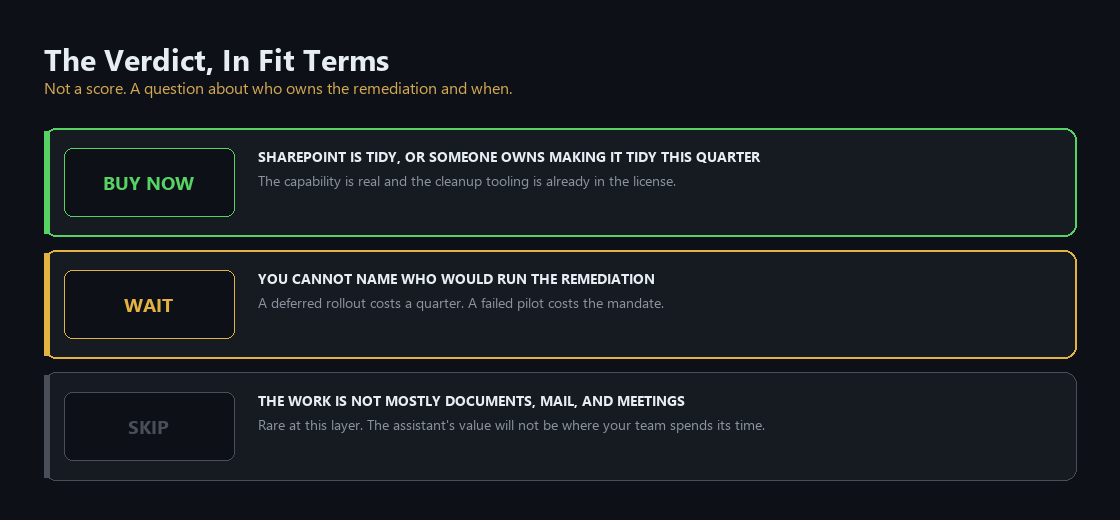
Buy now if your SharePoint estate is either genuinely tidy or you have a named owner and funded time to make it tidy this quarter. The capability is real and the tooling for the cleanup is included.
Wait if you cannot name who would run the remediation. Not because the product will improve much by waiting, but because the pilot you run today will produce a result you then have to argue with for a year. A deferred rollout costs a quarter. A failed one costs the mandate.
Skip is rarely the answer at this layer, with one honest exception: if the work your people do is not mostly documents, mail, and meetings, the assistant layer is not where your return is. Part 3 onward covers layers where the value is narrower and easier to measure.
The Monday checklist
Five things an IT lead can start this week, before any licensing decision is final.
- Run the readiness report. Get the real count of eligible users and technical blockers, rather than the headcount from the org chart.
- Run the content management assessment and the Purview risk assessment. You want the list of overshared, ownerless, and inactive sites, and where the sensitive content overlaps with them.
- Turn off tenant-level "everyone except external users." Then find the sites that were relying on it.
- Check where your mailboxes live. Any user whose primary mailbox is not in Exchange Online is not going to get what you are paying for.
- Name the owner of the remediation, with hours attached. This is the step that decides everything after it, and it is the one most often left as a shared responsibility, which means nobody's.
Nothing on that list requires a purchase, and all of it is worth doing whether or not you buy Copilot. That is the tell for a real prerequisite.
What comes next
Part 2 covers GitHub Copilot: what changed since the autocomplete era, what the agent that opens a pull request actually does on a real codebase, and why output you can compile and test makes this the easiest layer in the whole portfolio to defend to a CFO.
Product capabilities, licensing prerequisites, and deployment guidance in this post were verified against Microsoft's own documentation on 10 August 2026. This corner of the portfolio changes monthly. Check before you sign anything.
Matthew Kruczek is Managing Director at EY, leading Microsoft domain initiatives within Digital Engineering. Connect with Matthew on LinkedIn to discuss how your organization should approach the Copilot portfolio.
References
- Microsoft Learn, "Secure and govern Microsoft 365 Copilot: Foundational deployment guidance," three pillars and step order, accessed 10 August 2026.
- Microsoft Learn, "Configure a secure and governed foundation for Microsoft 365 Copilot," Step 1: Remediate oversharing.
- Microsoft Learn, "Restrict discovery of SharePoint sites and content," including the caution on excessive use.
- Microsoft Learn, "Restricted SharePoint Search," allowed-list behavior and defaults.
- Microsoft Learn, "Minimum requirements to deploy Microsoft 365 Copilot in your organization," licensing and Exchange Online mailbox requirement.
- Microsoft Learn, "License options for Microsoft 365 Copilot," qualifying base plans.
- Microsoft Learn, "Prepare for Microsoft 365 Copilot by comparing E3, E5, and E7 license features," E7 general availability 1 May 2026.
- Microsoft Learn, "Get ready for Microsoft 365 Copilot and agents with SharePoint Advanced Management," content management assessment and access reviews.
- Microsoft Learn, "Microsoft 365 Copilot readiness report" and "Microsoft 365 Copilot usage report," admin center reporting and latency.
- Microsoft Learn, "Copilot Control System overview," security and governance, management controls, measurement and reporting.
- Microsoft Learn, "Security for Microsoft 365 Copilot," permissions and data protection commitments.