The Copilot Stack, Part 0. A map of the dozen things wearing one name.
If you only have a minute, here's what you need to know.
- It is a brand, not a product. Microsoft has put the name on roughly a dozen things with different buyers, different bills, different prerequisites, and different verdicts. "Are we buying Copilot" has no answer.
- Five layers, in order: assistant, developer, specialist, platform, control. Read them as a maturity arc. Most organizations buy at the top and stop there.
- Every one of them inherits something. Microsoft 365 Copilot inherits your permissions. Security Copilot inherits your telemetry coverage. Fabric Copilot inherits your semantic model. The demo works because the demo tenant is clean.
- A surprising amount is already paid for. Copilot Chat, Azure Copilot, a security AI on top-tier plans, a free developer tier, and a long list of things bundled into the Copilot license that vendors still quote separately.
- The question worth asking: which layer are we buying, and is the thing it inherits in good enough shape to carry it?
The CFO has seen the demo. Somebody from Microsoft showed a director drafting a board summary in Word from four documents she had never opened, and the whole thing took eleven seconds. The question that comes back down is reasonable: are we buying Copilot or not?
It has no clean answer, because Copilot is a brand rather than a product. Microsoft has put that name on roughly a dozen things. They have different buyers, different bills, different prerequisites, and different verdicts. Some are already running in your tenant. One needs a data platform you may not own. Two are development platforms rather than products in the sense a CFO means, and buying one without a team to run it gets you a very capable blank page.
This series is a map of all of it, written for someone who could not currently name five of them. This post is the legend.
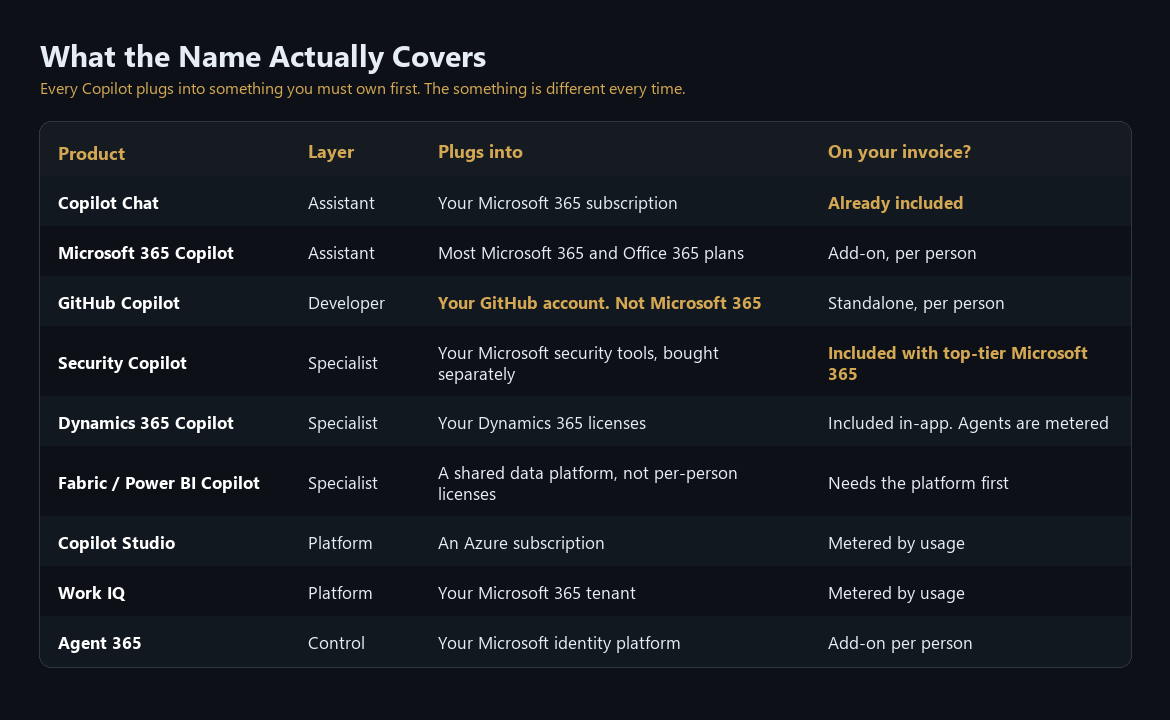
What the name actually covers
Before the layers, the question people actually arrive with: what does each of these attach to, and is it already on my invoice? Every Copilot plugs into something you must own first, and the something is different every time.
Three things that surprise most people
You probably do not need to upgrade everyone first. The common assumption is that Copilot requires your organization to be on a top-tier Microsoft 365 plan. The list of plans that qualify is considerably broader and cheaper than that, and includes several most people would not guess. If a quote arrives that bundles a company-wide upgrade with your Copilot seats, ask which part is genuinely required. Part 1 has the specifics.
GitHub Copilot has nothing to do with Microsoft 365. It attaches to GitHub instead. Your Microsoft 365 tier, your identity setup, and your document hygiene are all irrelevant to it, which makes it the one product here you can buy and run without touching anything else in this article.
Fabric Copilot is a data platform purchase with a Copilot attached. It runs on shared organizational capacity rather than per-person licenses, and the per-person Power BI licenses most companies already own do not qualify. If your analytics team is on per-user licensing, the question is whether you want the underlying platform, because the Copilot comes along after that decision rather than before it.
The five layers
Each layer has a natural owner and a different bar to clear before it works.
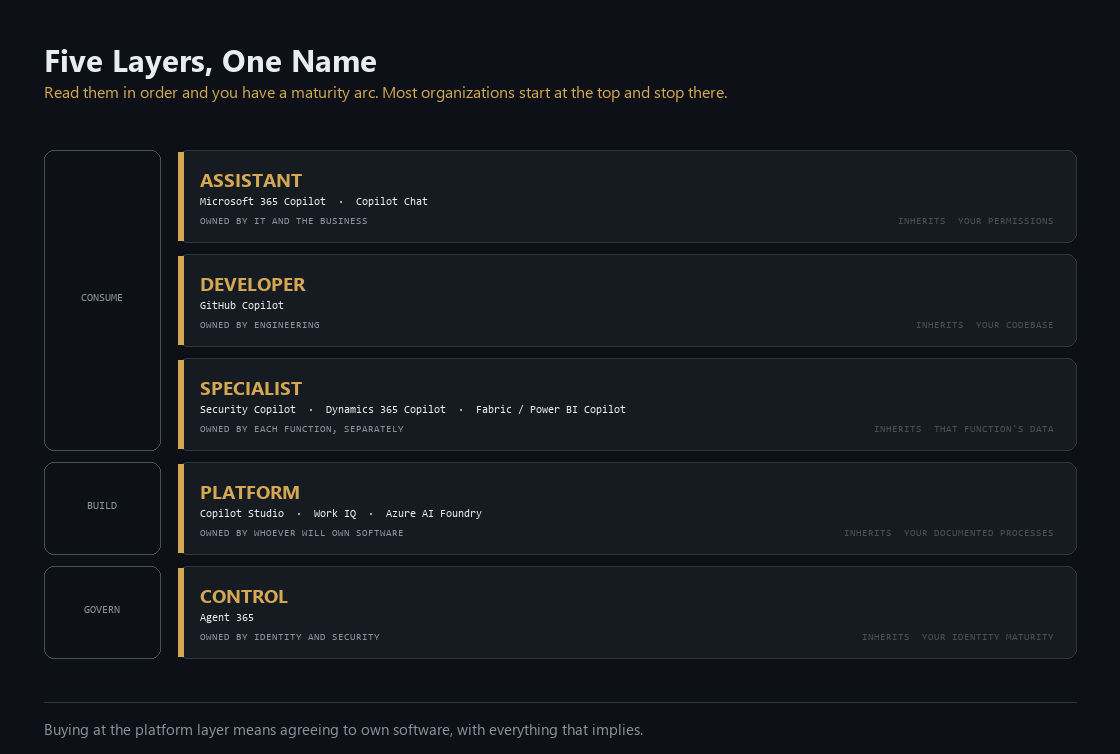
The assistant layer is what people mean when they say the word without qualifying it. Microsoft 365 Copilot sits inside Word, Excel, PowerPoint, Outlook, and Teams, and it can reason across your organization's files, email, chats, and meetings. It drafts, summarizes, and answers questions about work that already exists. The paid license also brings prebuilt agents, including Researcher and Analyst, which run longer multi-step jobs than a single chat turn allows. Alongside it sits Copilot Chat, a different thing entirely, which gets its own section below because the distinction is worth real money.
The developer layer is GitHub Copilot, the oldest product in the portfolio by several years and the most improved. Most executive mental models of it are stuck in 2023, when it autocompleted a line at a time. It now runs agents that take an issue, open a branch, write the code, and put up a pull request for a human to review. It is also the only Copilot where output is inherently observable, because code either compiles and passes tests or it does not. That single property makes it the easiest one to justify.
The specialist layer is where Copilot lives inside a function's own system of record, bought by that function rather than by IT. Security Copilot works across Defender, Sentinel, Intune, and Purview, both as a standalone workspace and embedded in the tools an analyst already has open. Dynamics 365 Copilot works inside your CRM and ERP, where it stops summarizing and starts writing records. Fabric and Power BI Copilot answers questions about your data in plain language. Three different buyers, three different budgets, and in most organizations none of the three talks to the other two. That fragmentation is why a company can be paying for the same underlying capability twice without anyone noticing.
The platform layer is where you stop buying Copilot and start operating one. Copilot Studio lets you assemble an agent from knowledge sources, tools, and instructions, then publish it to Teams or a website. Underneath it, Work IQ supplies shared organizational context to agents, so they can draw on your reporting and business-application data rather than starting cold. Azure AI Foundry sits underneath both, a set of building blocks for teams that have outgrown what Studio can assemble. Buying at this layer means agreeing to own software, with everything that implies: versions, testing, someone whose job it is when it breaks at 3:40 am.
The control layer is Agent 365, which exists because the four layers above it work. Once every department can build agents, somebody has to know how many exist and what they can reach. Agent 365 is a registry that populates itself. It discovers what the documentation calls shadow agents, meaning ones already running in your tenant that nobody told IT about. It then gives each agent a real identity, so an agent gets access reviews, a named owner, and an expiry date, the same way a contractor does. It arrived before most customers had the problem it solves, which tells you something about where Microsoft expects this to go.
Read those five in order and you have a maturity arc. Consume, then build, then govern.
Most organizations start at the top and stop there.
The pilot that goes nowhere
The common path is sensible enough that almost everyone takes it. Buy Microsoft 365 Copilot, roll it to a few hundred people, wait a quarter, survey them, decide.
The result is often a shrug. Some people love it, most stopped opening it after the second week, and the champions cannot explain what changed in terms a CFO recognizes. Somebody writes a summary saying the technology is promising but immature, and the program goes quiet until next year's planning cycle.
The conclusion is usually wrong, and the reason is more interesting than the adoption number.
What got tested was one product at one layer, running against data nobody had prepared. The specialist and platform layers, where returns are easier to measure because the work is narrower and the output is checkable, were never reached. That was not an oversight. Every layer is gated on the same underlying condition, and a broad assistant rollout is the worst possible way to discover it.
Every Copilot inherits something
Copilot is not software that sits on top of your organization. It is software that runs on your organization, and it can only be as good as the state that organization is in.
Every vendor demo runs on a clean tenant. That is not a criticism of Microsoft specifically, it is what a demo is: twelve documents, correct permissions, sensible file names, no ambiguity about which version of the pricing deck is current. Your tenant has 400,000 documents and eleven versions of the pricing deck, four of them on a SharePoint site whose owner left in 2023. The distance between those two environments is where most Copilot disappointment lives.
Each product inherits a specific precondition.
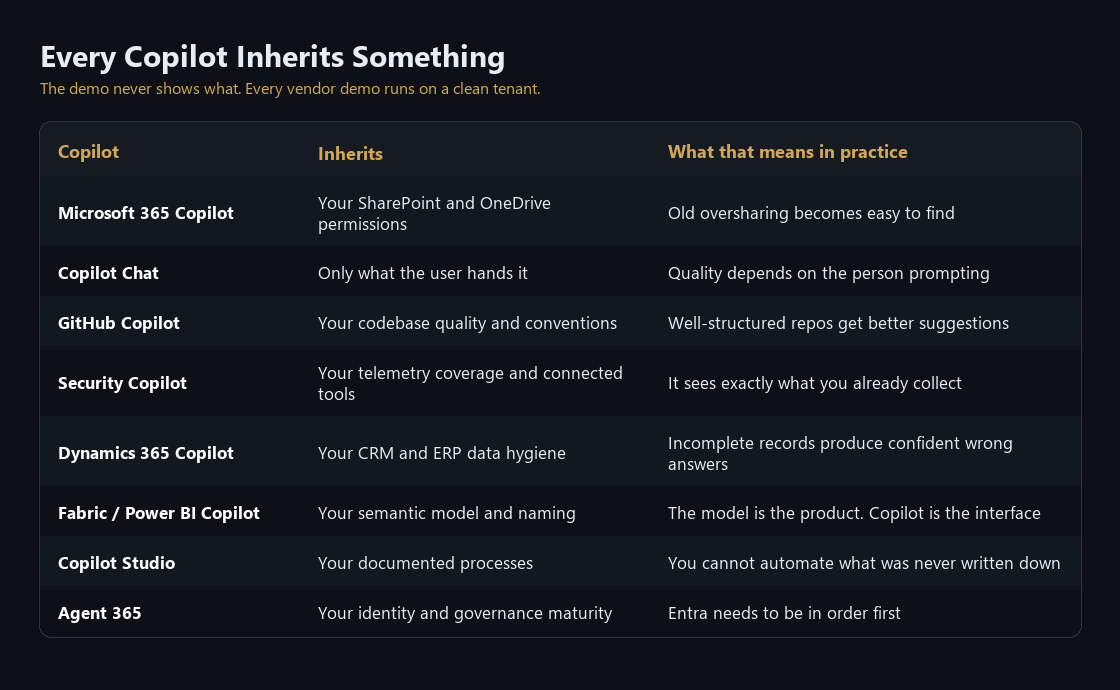
None of this is hidden. Every precondition above is documented, usually in the product's own setup guidance, and usually with tooling attached to help you meet it. The gap is between what the documentation says and what gets read before a contract is signed.
Permissions bite first and hardest. Microsoft's deployment guide for Microsoft 365 Copilot opens with a step titled "Remediate oversharing," and it is meant to happen before anyone gets a license. The work it describes is unglamorous: find the documents your company has quietly shared with everyone, give ownerless sites an owner, archive what nobody has opened in years. There is tooling for it, including a switch that hides sensitive sites from Copilot while the cleanup happens.
Worth being precise about the risk, because it gets overstated. Copilot grants nobody access they did not already have, and it honors every permission in place. What changes is discoverability. The finance folder that was technically open to the whole company for six years was safe through obscurity, because nobody knew the path. Now anyone can ask a question in plain English and find it. The exposure was always there. Copilot makes it legible.
Analytics has the clearest artifact. Power BI's guidance states that without preparation, Copilot "can generate less helpful and inaccurate results," and elsewhere that an unprepared model can produce output that "might be incorrect or even misleading." So there is a preparation step: hide the fields Copilot should ignore, teach it your business vocabulary, record verified answers for questions you know people will ask. Then you mark the dataset approved.
Until you do, answers drawn from it carry a visible warning telling the user to check the result and ask the owner to prepare the data. The label is a reasonable design choice and also a useful signal for a buyer: a vendor does not build a warning like that unless unprepared data is a common enough outcome to need one.
Security Copilot sees what you already collect. It runs queries as the signed-in user and never has more access than that person does, so an analyst with narrow permissions gets narrow answers. Its reach comes from connections to your security tools, and the documentation is direct that those products are purchased separately. It is a lens over an estate you bought previously. Buy it expecting a lens and it does that well. Buy it expecting to fill gaps in your detection coverage and it will show you the gaps instead.
Business applications come down to data hygiene. Microsoft's implementation guidance for Dynamics 365 includes a checklist that asks, in effect, whether your salespeople are actually using the CRM: are customers, activities, and deals genuinely being recorded, and is anything in place to prevent duplicates. There is also a way to teach Copilot what your company means by a term like "closed lead," because otherwise it infers from column names and guesses.
And on code, from GitHub's own documentation: "An AI model doesn't know your schema, your naming conventions, your business rules, or which server you're pointing at, unless you tell it."
Eight products, one pattern. The capability is real and so is the precondition. The precondition is just much harder to demonstrate. A demo can show you eleven seconds of drafting. It cannot show you the six weeks of permission cleanup that made those eleven seconds trustworthy, which is why that work tends to surface after the invoice rather than before it.
The five questions
Every post in this series asks the same five things about one product, in the same order. The frame is worth more than any individual answer, because Microsoft will ship three more Copilots before this series finishes and you will want somewhere to put them.
What is it actually? Strip the branding off and describe the thing. What would you call it if it had a different name?
What job does it do? Not the keynote demo. Who is the real user on an ordinary Tuesday, and what were they doing before?
What does it inherit? The precondition that decides whether this works well in your environment or merely works.
What does it take to run? Who owns it, which skills it needs, what governance it demands, and what it costs you in people rather than dollars.
What does it cost, and is it worth it? Pricing, then a verdict: buy now, wait, or skip.
That last question gets a section, not an article. Price is the easiest thing to look up and the least useful thing to lead with, and a product at thirty dollars a seat that people use daily is cheaper than one at ten that nobody opens.
What is already on your invoice
A surprising amount of this portfolio is already paid for, in two different ways. Some of it comes free with subscriptions you almost certainly hold. The rest is bundled inside the Microsoft 365 Copilot license, which matters because several of those pieces are also sold separately, and buying them twice is an easy mistake.
Free with what you already own
Copilot Chat ships with most Microsoft 365 and Office 365 subscriptions. Prompts are not used to train models, and users get file upload, image generation, and shareable AI-generated pages. The distinction that matters is what it can see: the free chat is grounded in the public internet, while the paid license is what lets it reason across your own email, meetings, files, and chat history. Someone on the free tier can paste in a document or work with a file they already have open, but it does not reach into your organization's content on its own.
Azure Copilot is included at no extra cost for anyone with an Azure subscription, and it is on by default for every user in the tenant unless an administrator turns it off. It helps with operational work: explaining what a resource is doing, drafting queries, walking through a configuration. If your infrastructure team has an Azure footprint, they have this today. Microsoft notes that future capabilities might carry a price, so this is worth revisiting rather than assuming permanence.
Security Copilot comes with the top Microsoft 365 tiers. Organizations there get a monthly allowance of security AI capacity that scales with how many people they license, it switches on automatically with no setup, and the allowance resets each month. Until recently this was capacity you rented by the hour whether or not anyone used it, so the change is meaningful. If you are on a top-tier plan and have never opened it, it is sitting there unused. Part 3 works through whether it deserves your team's attention.
GitHub Copilot has a free tier. Every developer can get a couple of thousand code completions and a small number of chat requests each month at no cost. It is limited on purpose, but it means you never have to buy seats to find out whether your engineers will actually use it. Run the free tier first and let the usage data make the case.
Dynamics 365 and Business Central include Copilot features in the app. Business Central's documentation is unambiguous that Copilot comes at no extra cost with the license, with the caveat that quotas might arrive later. On the Dynamics side, the mainstream licenses cover the basic assistance while the more capable agent features sit behind the paid Microsoft 365 Copilot license.
Already inside the Microsoft 365 Copilot license
This is the part that saves real money, because every item here is something a vendor or a well-meaning team might propose buying.
The oversharing cleanup tooling. The permission reports, access reviews, and content-discovery controls described earlier are normally a paid add-on. Assign a single Copilot license to a single person and your SharePoint administrators get that tooling for the entire tenant. The cleanup then costs attention rather than another line item. A few narrow features do stay behind the paid add-on, so confirm the specific ones you need, but everything that matters for a Copilot rollout is there.
Meeting and call recap. AI-generated meeting notes, action items, and the ability to browse a recording by speaker and topic come with either a Teams Premium license or a Copilot license. Plenty of organizations bought Teams Premium for the recap and later bought Copilot on top of it. Teams Premium still earns its place for meeting protection, real-time caption translation, and large-scale events, and none of that comes with Copilot. If recap was the reason you bought it, that reason is now covered twice.
Building agents for Teams, SharePoint, and Copilot Chat. If your people hold Copilot licenses, they can build and run agents in those places at no additional charge. Organizations regularly start a separate Copilot Studio purchase for work already covered. The separate purchase becomes necessary when you go further: agents on a public website, agents running autonomously, or agents used by people who do not hold a Copilot license. Part 6 draws that line properly.
The research and analysis agents. Researcher works multi-step questions across your own content and the open web and returns something closer to a briefing than an answer, with citations. Analyst takes raw data and reasons through it the way a data analyst would, showing its work. Both are included, both switch on for licensed users with no admin setup, and neither carries a separate charge. They sit in the tools menu inside Copilot, which is why most licensed organizations have them and have never opened them.
Copilot Search, the developer APIs, and the usage analytics are part of the same license. The connectors that pull in third-party systems like Salesforce, ServiceNow, or Confluence are included for grounding Copilot, though how much content you can index depends on your underlying Microsoft 365 plan rather than on Copilot.
The practical consequence of all of it: if your organization runs Microsoft 365, you have already deployed an AI chat tool to your entire workforce. If you run Azure, your infrastructure team has one too. If you are on a top tier, a security AI is sitting idle. People are using some of this whether or not anyone decided they should. Measure that baseline before commissioning a pilot of anything paid, because treating it as zero will overstate what the paid license adds. The same discipline applies to the second list. When a quote arrives, check each line against what the Copilot license already covers.
What comes next
Eight more posts, one per product family, five questions each.
Part 1 covers Microsoft 365 Copilot, the one everybody means, where the story is permissions. Part 2 is GitHub Copilot, the clearest value in the portfolio and the one with a real measurement story. Parts 3 through 5 work through the specialists: Security Copilot, Dynamics 365, and Fabric. Parts 6 and 7 cover the platform layer, Copilot Studio and then the graduation path to Work IQ and Foundry. Part 8 closes on Agent 365 and the portfolio question: what to buy, in what order, and what to leave until next year.
If one thing survives this post, make it the better version of the CFO's question. Which layer are we buying, and is the thing it inherits in good enough shape to carry it?
For most organizations the honest answer to the second half is not yet, and that is a fixable problem. It is also a great deal cheaper to fix in the quarter before the licenses land than in the quarter after. Microsoft has already written down how. The guides are free, they are good, and almost nobody reads them before signing.
Prices, licensing, and product capabilities in this series were verified against Microsoft's own documentation as of August 2026. This corner of the portfolio changes monthly. Check before you sign anything.
Matthew Kruczek is Managing Director at EY, leading Microsoft domain initiatives within Digital Engineering. Connect with Matthew on LinkedIn to discuss how your organization should approach the Copilot portfolio.
References
- Microsoft Learn, "Microsoft 365 Copilot overview" and "Prepare for Microsoft 365 Copilot by comparing E3, E5, and E7 license features," accessed August 2026.
- Microsoft Learn, "License options for Microsoft 365 Copilot," accessed August 2026.
- Microsoft Learn, "Get ready for Microsoft 365 Copilot and agents with SharePoint Advanced Management," Step 1: Remediate oversharing.
- Microsoft Learn, "Prerequisites for SharePoint Advanced Management," accessed August 2026.
- Microsoft Learn, "Intelligent recap for Teams calls, meetings, and events," licensing prerequisites.
- Microsoft Learn, "Agents admin guide for Microsoft 365," Researcher and Analyst inclusion.
- Microsoft Learn, "Microsoft 365 Copilot Search frequently asked questions" and "Prerequisites for deploying connectors."
- Microsoft Learn, "Manage Microsoft 365 Copilot Chat," eligibility list.
- Microsoft Learn, Azure Copilot overview and cost guidance, accessed August 2026.
- Microsoft Learn, "Copilot in Microsoft Dynamics 365 Business Central" licensing guidance.
- Power BI documentation, "Update your data model to work well with Copilot," including the Approved for Copilot flag and friction treatment.
- GitHub Docs, "Prompt engineering for GitHub Copilot," schema and convention guidance.
- Microsoft Learn, "Overview of Microsoft Agent 365," shadow agent discovery.