Building an agent in Copilot Studio costs nothing up front. Running one does.
If you only have a minute, here's what you need to know.
- This part is different from the ones before it. Every earlier part asked whether somebody else's product was worth buying. This one asks whether you can operate what you built yourself.
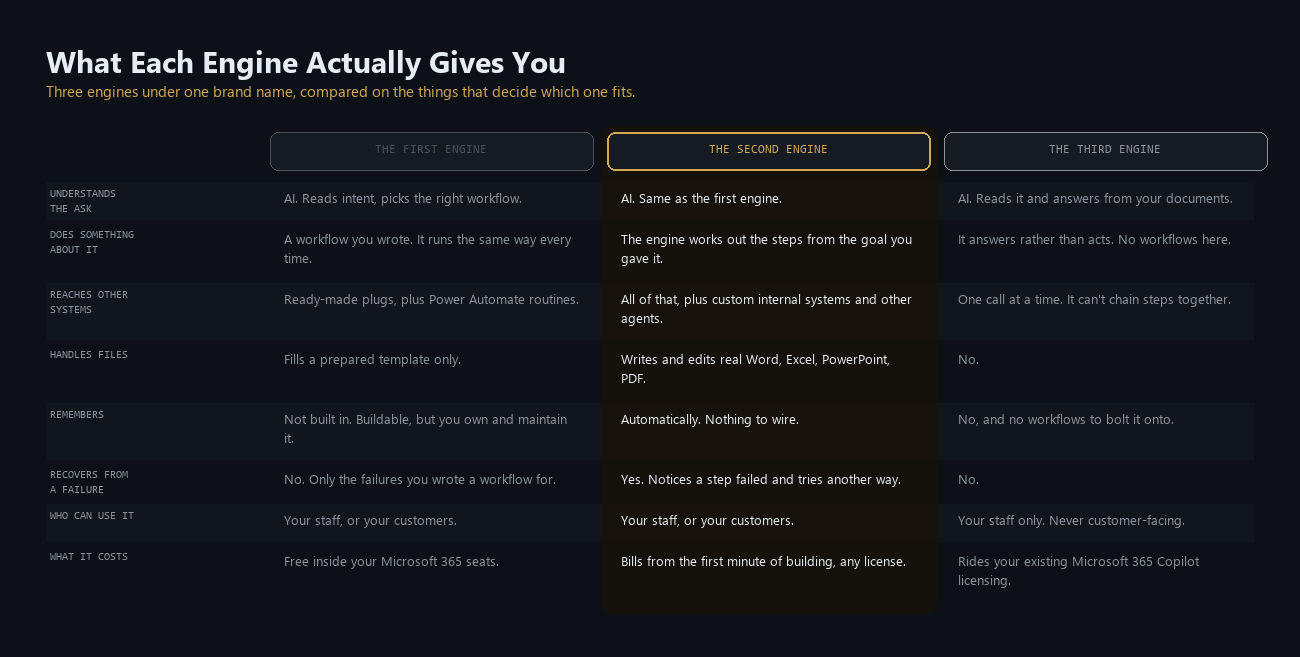
- Copilot Studio isn't one engine, it's three, under one name. Split the work into understanding the ask and doing something about it. The first puts AI on the understanding, then runs a workflow you wrote. The second puts AI on both. The third only ever does the first half, answers rather than acts, and can never be pointed at customers.
- Power Automate is in here, renamed. The routines your teams already build there are the same capability Copilot Studio now offers under its own name, and moving one in shifts it onto Copilot Studio's meter permanently. Two of the three engines can trigger them.
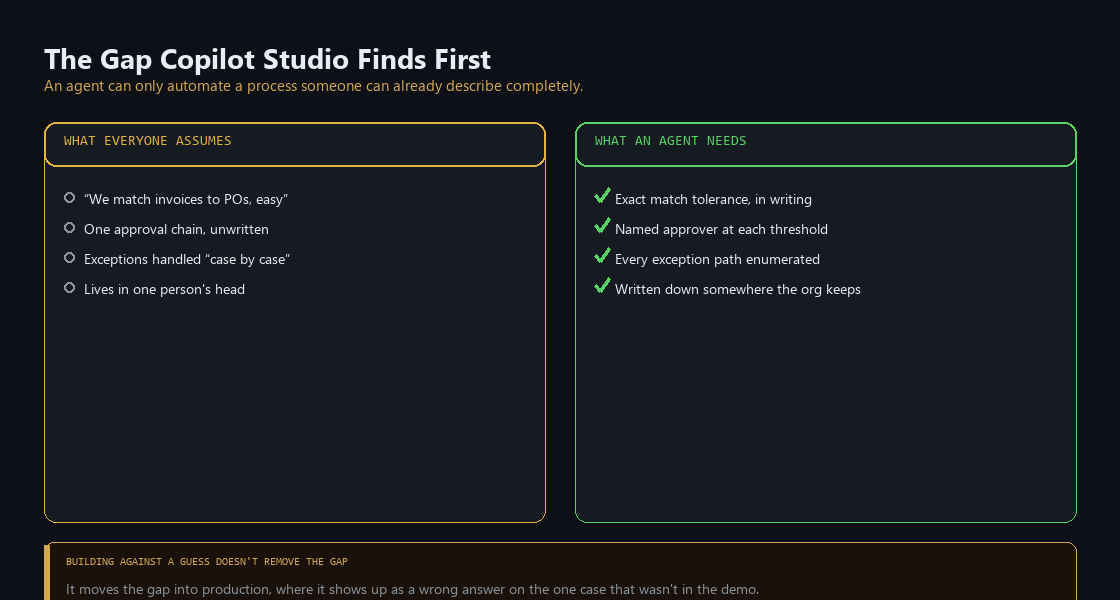
- The precondition isn't a dataset or a telemetry feed here, it's a document. An agent can only automate a process that already exists in writing, exceptions included. Most organizations discover theirs lives in one person's head.
- An agent that ships without a named owner still runs. Microsoft's own guidance treats that as the real gap: no executive accountable for the portfolio, no decommission criterion, no visible escalation path.
- Copilot Credits meter almost everything, roughly a cent apiece, allocated per environment rather than pooled across the tenant, and expiring monthly instead of carrying forward.
- Free to build is real, and it's only the build. A Copilot Studio license costs nothing to assign. What it costs to run responsibly is what this post is about.
Part 5 covered Fabric, where Copilot answers questions about data someone else modeled. Part 6 hands over the modeling clay. Copilot Studio lets people well outside engineering define a process, wire it to real systems, and publish something that acts on their behalf. Every earlier part asked what a vendor's product does and what it costs. This one asks what happens after you publish something you made yourself.
What it actually is
Copilot Studio is an agent-building platform carrying three different engines under one product name. Each has its own building experience, and an agent built on one doesn't appear in another's list. Microsoft's documentation calls them "harnesses," the word to search for in Microsoft Learn. This post says engine.
Say an employee messages the help desk: "What's the status of my expense reimbursement?" Each engine handles that identical sentence differently.
The first engine: AI on the way in, fixed on the way out
The standard engine splits the work in two. The AI works out what someone is asking for. A workflow does the rest, and the workflow is fixed.
You build the workflows, which Copilot Studio calls topics: one for reimbursement status, one for time-off requests. You attach the expense policy as a document. The question comes in, the AI reads it, and it runs the reimbursement workflow. The reading is the intelligent part. It works out what the person meant rather than waiting on exact wording, and when nothing fits a workflow, it can answer out of the policy document instead.
The workflow itself is fixed. It runs the same way every time. Say it returns "pending, awaiting manager approval, eleven days." That is the answer the employee gets. The engine won't work out which manager or send them anything, because no workflow does that, and deciding one is needed isn't its half of the job.
A workflow that only talks needs no extra plumbing. But the moment one has to reach into a different system, check a real record or change one, it needs a connection to that system, built on purpose. Usually that means a ready-made plug-in Microsoft already ships for a specific product, one for Outlook, one for Salesforce, one for ServiceNow. Point it at the right account and it works. If the product you need isn't on that shelf, you build the same kind of plug-in yourself.
A plug-in buys one action in one system, and plenty of work isn't that shape. "Open the ticket, route it for approval, update the record once it clears, tell the requester" is four actions across three systems with a wait in the middle, and none of it is a conversation. That belongs somewhere other than a workflow built for talking to people, and most organizations built it somewhere else years ago.
That somewhere else is Power Automate. Chaining steps across systems is what it has always done. Copilot Studio now offers the same capability inside itself under its own name, built with the same drag-and-drop designer and the same connectors your teams already use, and a workflow can hand off to one. The division of labor: the AI reads the ask, a workflow carries the conversation, a routine does the work in your other systems.
An existing Power Automate flow can also be moved over, which shifts it onto Copilot Studio's meter instead of its own. That move runs one flow at a time, requires Copilot Studio capacity already allocated to the environment that flow lives in, and cannot be undone.
AI, workflow and routine together cover a lot. Three things you don't get with this engine. They aren't equally missing.
Memory, in the sense of remembering anything between conversations. You can build it: connect a database and a workflow can write down a fact and read it back later. That has to be wired up in every workflow where it matters, then maintained. Microsoft doesn't document this as a supported pattern, so treat it as engineering you own rather than a feature you switch on.
File handling. A connection can fill a prepared template with the right values, which covers a mail-merge shaped problem. Writing or editing a document's actual content is a different capability, and connecting more things won't get you there.
Recovery from a failure. This one no amount of connecting helps with, because recovering means deciding what to do instead, which is the fixed half. You can build workflows for failures you anticipate, and nothing covers the rest.
The second engine: AI on both halves
The second engine, which Microsoft calls GitHub Copilot, keeps the second half for itself. It reads the ask the same way the first one does, then decides what to do about it rather than running a workflow you wrote. Despite the name, this has nothing to do with the coding tool developers already use. The two share underlying technology, not a data path, and Microsoft's own documentation states customer data is never sent to or processed by that product. From here this post calls it the second engine.
Same reimbursement question, same "pending, awaiting manager approval" coming back from the finance system. Here the engine treats that as an unfinished job rather than an answer: it works out which manager, checks whether they're out of office, drafts them a note, and reports back what it did rather than only what it found. None of those steps were built in advance.
It reaches everything the first engine reaches, the same plug-ins and the same Power Automate routines, plus two things the first engine has no version of. It can connect to an internal system that has no off-the-shelf plug-in, using Model Context Protocol, a growing industry standard that lets a system describe its own capabilities to an agent instead of somebody building an integration by hand. And it can call another agent to handle a part of the process it doesn't own.
The first engine's three gaps all close here. Failure recovery is described above. This engine also writes and edits real Word, Excel, PowerPoint and PDF files rather than filling a prepared template, and it carries memory forward on its own, with no database behind it.
The third engine: the first half only
The third engine never gets to the second half. It understands the ask and answers it. Acting on it isn't in scope, beyond a single reach into one system and the answer coming back. There are no workflows here, so there is nothing to run.
That makes it the lightest build of the three. You write plain-English instructions, something on the order of "You help employees with HR questions. Keep answers short, and send anything about payroll to the finance team." Then you point it at your own documents. An agent does get created, though nothing about the authoring looks like the other two.
Agents from the other two engines can also be published into the Microsoft 365 Copilot window, so this isn't the only way to put a specialist where people already work. The difference is that this is the only place this one goes. Microsoft's comparison lists the other two as publishable to internal teams or external customers, and this one to internal teams only. It cannot be pointed at a customer.
It also doesn't deploy itself. Publish a standalone agent from the other engines and it lands in its channel. This one has to be distributed deliberately, through a share link or by an administrator adding it to the organization's catalog.
The first engine's three gaps apply here too, with thinner workarounds, because there are no workflows to wire a database into. Treat memory, file creation and self-recovery as absent here, not absent and engineerable.
There's a second axis underneath all three: where you build. Microsoft 365 Copilot ships its own lightweight builder, Agent Builder, for quick single-person agents described in plain language, with no extra license to buy. Copilot Studio is the full version, with richer configuration, environment management and governance controls Agent Builder doesn't carry. An agent built in Agent Builder can be copied into Copilot Studio later, and that copy is when the governance and lifecycle controls switch on. That matters because somebody in your organization may already be building in the lightweight one. The rest of this post is mostly about the first two engines, since they're the ones that reach your real systems and run up a real bill.
What it inherits
A process that exists somewhere other than in someone's head
What decides whether any of this works has nothing to do with the software.
The example Microsoft picks for the second engine is accounts payable: an agent reads an incoming invoice, matches it against a purchase order, and routes anything that doesn't reconcile to a person.
Why does that need an engine that reasons, when the decisions are deterministic? Match or don't, approve or escalate, a flowchart handles those. The decisions were never the hard part. Invoices arrive in a few hundred vendor layouts, and working out which number on an unfamiliar one is the total rather than the order reference is judgment, not a rule. Neither is "matches the purchase order" a clean equality check, once partial deliveries and freight lines and your vendor's wording get involved. Deciding whether two things that don't look identical are the same thing is what needed the reasoning.
So the rules in that example are written down and the inputs are messy. That combination is rarer than the demo suggests. Finance is one of the few departments that really does have a documented tolerance policy. Most processes run the other way: tidy inputs, rules living in somebody's head. Which makes accounts payable a poor template for whatever your own people want to automate first.
Ask five people on a team to describe their approval chain and the mismatch threshold they apply without thinking about it. The answers rarely agree with each other, let alone with the process document, if one exists. The first gap a Copilot Studio project finds is usually that one: between what everyone assumed the process was and what it turns out to be once somebody states it precisely enough for a machine to follow. Building against a guess doesn't close that gap, it moves it into production, where it shows up as a confident wrong answer on the one invoice that didn't look like the demo.
This site has covered the same failure from the other direction: Why Your Agent Forgets the Rules makes the case about AI coding agents, that a rule living only in prose has no guarantee of surviving contact with one. The same applies to a business process, without a codebase to point at.
Nobody is the owner until somebody is
Every agent Copilot Studio creates is automatically registered with Microsoft Entra Agent ID, and whoever built it becomes that identity's sponsor, whether or not anybody meant to assign one. Microsoft's own build-readiness guidance treats the absence of a named, accountable owner as the governance failure that matters most: no executive running portfolio reviews, no Responsible AI impact assessment before launch, no escalation path a user can see, no written criterion for when the agent gets turned off. The platform enforces none of it. All of it is a checklist someone completes before the agent goes live, rather than after it breaks.
What it costs, and is it worth it
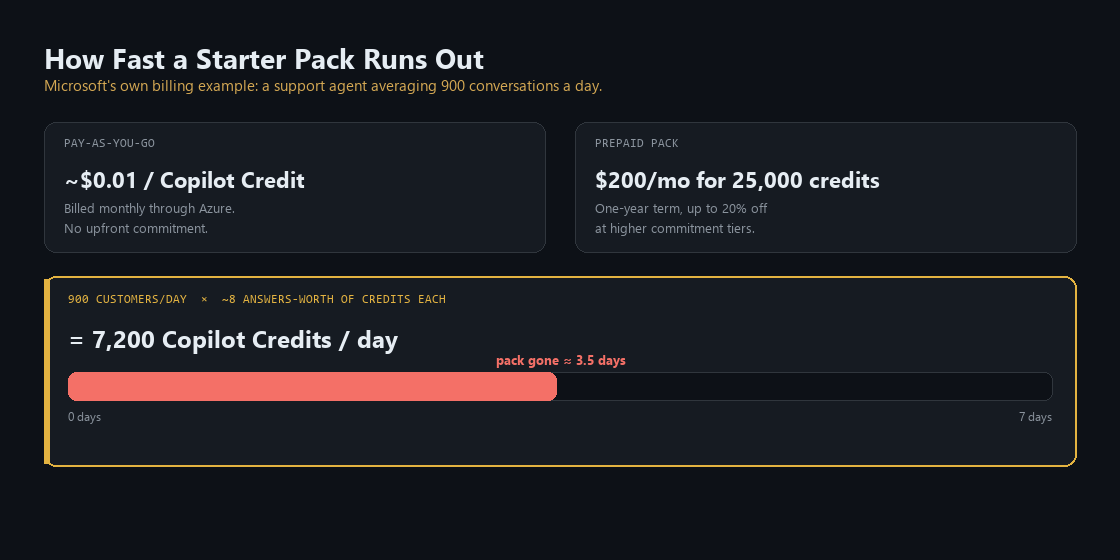
Assigning someone a Copilot Studio license costs nothing, but only once the tenant holds a prepaid Copilot Credit pack. Everything an agent does afterward is metered in Copilot Credits, the single currency behind all three engines. Two ways to buy them: pay-as-you-go through an Azure subscription at roughly a cent per credit, or a one-year prepaid plan of 25,000 credits for about $200 a month, discounted up to 20% for committing further upfront. Capacity is allocated per environment, so a pack bought for one doesn't quietly cover another. Unused credits don't roll forward, and running past your capacity can deny service rather than simply overbill.
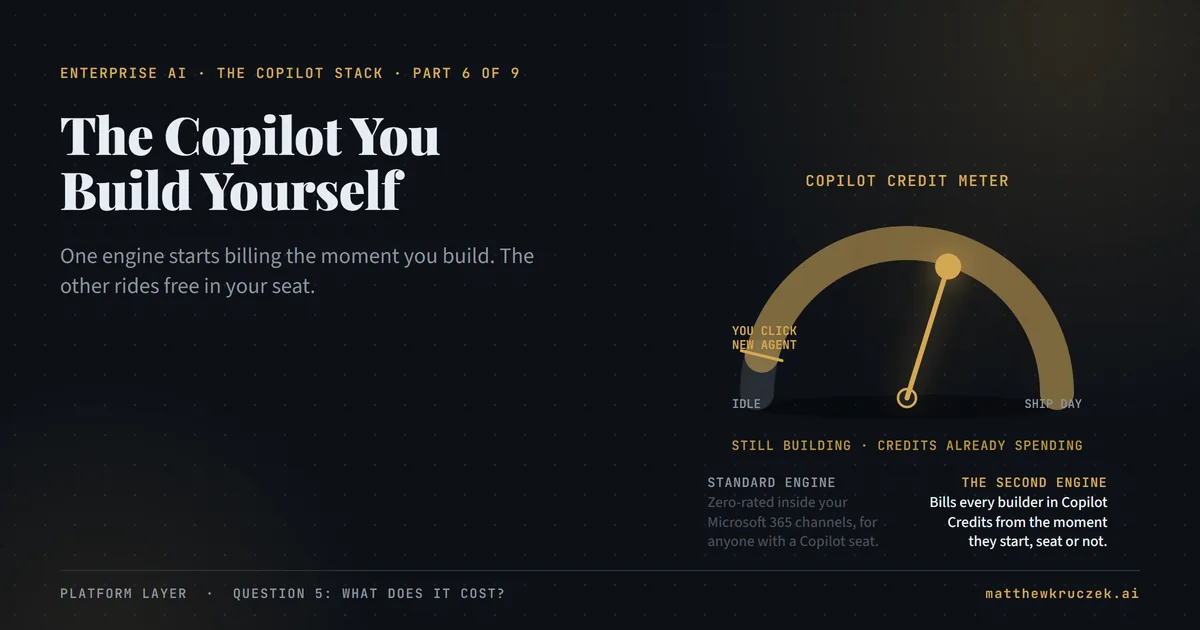
The two engines don't draw on that pool the same way. First-engine usage inside Microsoft 365 channels, Teams, Copilot Chat, SharePoint, by someone who already holds a Copilot seat, never touches the credit pool at all. The second engine has no such exemption. It bills every user regardless of license, starting the moment someone begins building rather than when a finished agent answers its first real request.
Microsoft's own billing example puts numbers on it. A support agent handling 900 conversations a day works out to roughly 7,200 Copilot Credits daily, on the order of $70. That $200 starter pack covers well under four days of that traffic. The budget for building an agent and the budget for people using it are different numbers, and the second arrives faster than most first purchases account for.
The verdict, in fit terms:
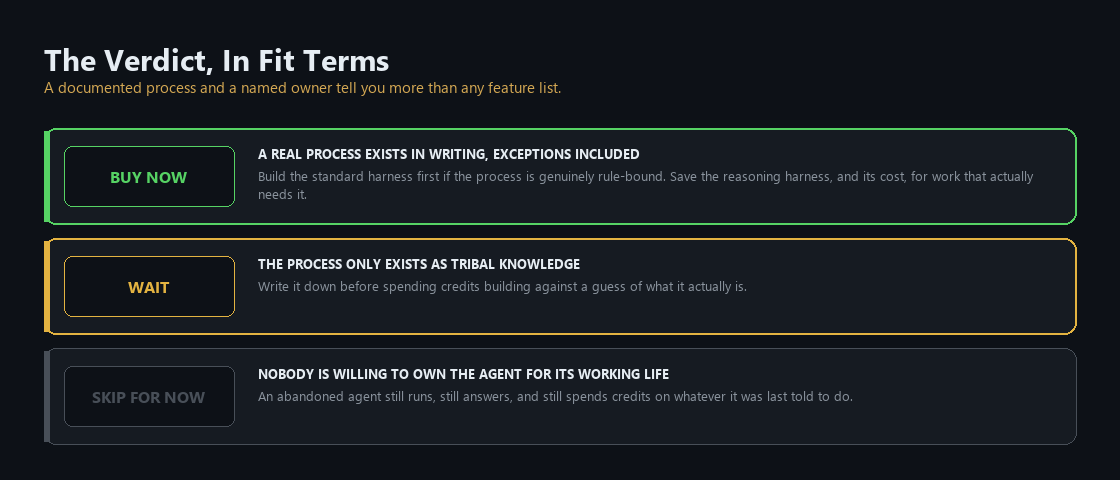
Buy now if a real process already exists in writing, exceptions included, and someone is willing to be named as the agent's owner before it launches, not after something goes wrong. Build the first-engine version if the process is rule-bound, and save the second engine, and its cost, for work that needs to reason across steps.
Wait if the process only exists as tribal knowledge. Spend the time writing it down before spending credits building against a guess of what it is.
Skip for now if nobody is willing to own an agent for its working life, review its Monitor page, and decide when it gets retired. An abandoned agent keeps running, keeps answering, and keeps spending credits on whatever it was last told to do.
What it takes to run
Running an agent well means picking up work Copilot Studio makes available but never turns on by default.
Lifecycle management is the first job, and it borrows Power Platform's existing discipline: development separated from test, test from production, each behind its own access group. Changes get built in development and promoted downstream, never edited directly further along the chain. Teams that want it can layer on the same source control and release pipelines they use for code.
Testing is the second, and it matters most on the second engine, where the output varies. Microsoft's Copilot Agent Kit runs batch tests against sets you define, and grades the kind of generative answer that has no single correct string to check against. None of it runs until a team decides what a passing answer looks like and writes the tests.
Monitoring is the third, and the one most likely to lapse. Copilot Studio keeps a year of usage analytics and 28 days of full conversation transcripts, takes custom metrics you describe in plain language, and can pipe telemetry into Application Insights for anything embedded in a larger process. There's also a calculator that turns time saved per run into a running return figure. All of it requires somebody to look at it on a schedule, which is a staffing decision rather than a licensing one.
The Monday checklist
Four things a platform owner or IT lead can check this week.
- Confirm whether the tenant already holds a Copilot Studio license and a Copilot Credit pack. A surprising number do, sitting unused, well before anyone asks for a purchase order.
- Pick the one process that's documented today, exceptions included, and build against that first. Not the one with the most theoretical value: the one you could hand to a new hire and have them execute correctly without asking a single follow-up question.
- Name an owner for that agent before it goes live, someone who checks the Monitor page on a schedule and can state, in one sentence, the condition under which the agent gets turned off.
- Match the engine to the job before building anything. A help-desk agent choosing among answers you already wrote doesn't need the second engine's cost, and a multi-step process will fight the first engine the whole way.
What comes next
Part 7 covers Microsoft Foundry and Work IQ, and the test Microsoft publishes for telling whether a team needs either.
Product capabilities, licensing terms, and pricing in this post were verified against Microsoft's own documentation on 24 September 2026. Copilot Credit pricing and pack sizes are billed through Azure and can change; confirm current rates before committing to a purchase.
Matthew Kruczek is Managing Director at EY, leading Microsoft domain initiatives within Digital Engineering. Connect with Matthew on LinkedIn to discuss how your organization should approach the Copilot portfolio.
References
- Microsoft Learn, "Harnesses in Copilot Studio." The three engines side by side: how each works, failure recovery, file handling, memory, publishing audience, billing. Also the statement that customer data is not sent to or processed by the GitHub Copilot service.
- Microsoft Learn, "Extend Microsoft 365 Copilot with the Copilot chat harness." What an author configures, confirmation that an agent is created, custom agents versus declarative agents, publishing and distribution, tools as single-turn interactions.
- Microsoft Learn, "Add tools to custom agents." Connectors, agent flows, prompts and REST API on the standard engine, and generative orchestration as the default versus classic mode.
- Microsoft Learn, "Agent flows overview." Agent flows as the standard engine's automation surface, and the one-way conversion of a Power Automate cloud flow onto Copilot Studio capacity.
- Microsoft Learn, "Available tools for agents (GitHub Copilot)." Connectors, MCP servers and workflows as the second engine's tool types.
- Microsoft Learn, "Choose between Microsoft 365 Copilot and Copilot Studio to build your agent," and "Copy an agent to Copilot Studio." Agent Builder versus Copilot Studio, and what copying one across switches on.
- Microsoft Learn, "Licensing for agents powered by the standard harness." Free user license requiring a prepaid credit pack, pay-as-you-go mechanics, capacity enforcement, zero-rated usage in Microsoft 365 channels.
- Microsoft Learn, "Overview of usage-based billing" and "Manage costs for agents powered by the GitHub Copilot harness." Billing from build time rather than runtime, and which usage a Copilot license offsets.
- Microsoft Learn, "Billing rates and management," plus Microsoft Azure's "Optimize Copilot Credit costs with a pre-purchase plan." The 7,200 credits/day support-agent example and the $0.01 per credit rate.
- Microsoft, Copilot Studio product page. Prepaid packs at $200 per 25,000 credits monthly, up to 20% savings, Azure subscription requirement.
- Microsoft Learn, "Establish an application lifecycle management strategy," and "Manage your Copilot Studio projects." Environment strategy, promotion discipline, source control, and the governance phases.
- Microsoft Learn, "Copilot Agent Kit overview." Batch testing and rubric-based grading.
- Microsoft Learn, "Define value before you build your agent." Named executive accountable for the portfolio, Responsible AI impact assessment, escalation path, decommission criterion.
- Microsoft Learn, "Agent identities and authentication for Copilot Studio." Automatic Entra Agent ID assignment, builder added as sponsor by default.
- Microsoft Learn, "Monitor overview" and "Communicate the value story to stakeholders." Analytics and transcript retention, custom metrics, Application Insights telemetry, the savings calculator.