The day Security Copilot activates on a Microsoft 365 E5 or E7 tenant, eight admin roles already sitting in your Entra ID become its owners and contributors. Nobody in security chose that mapping, and there's no approval step to decline it.
If you only have a minute:
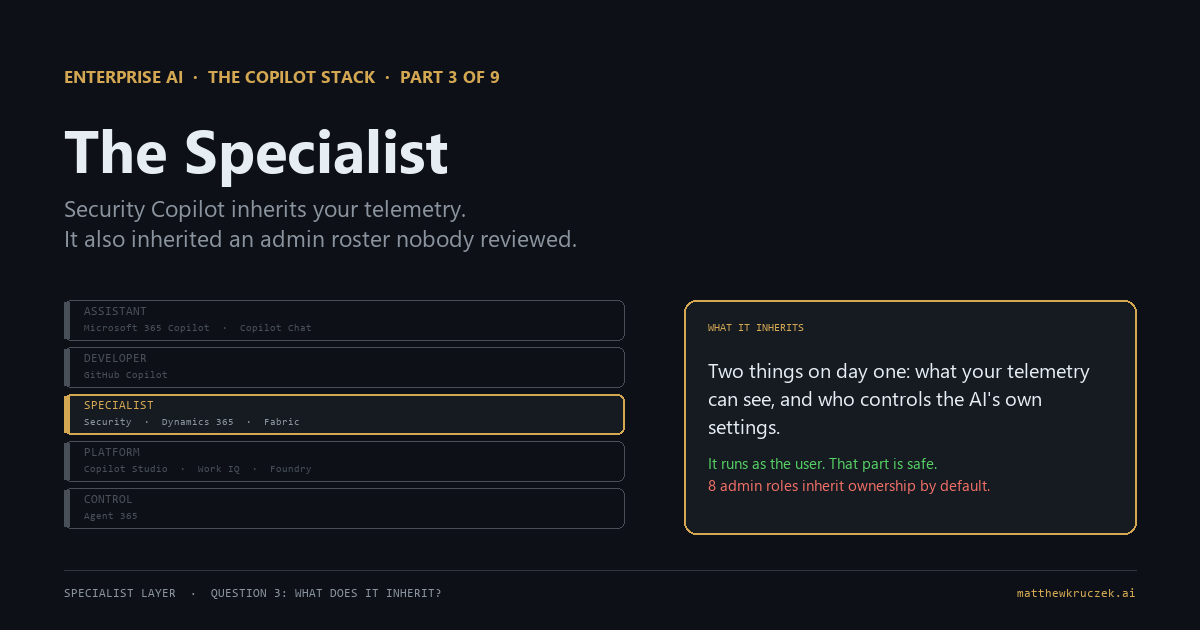
- It inherits two things on day one, and only one of them is safe by default. What it can see comes from your existing telemetry and the asking user's own permissions, and that part Microsoft got right. Who controls its own settings comes from a pre-existing admin roster nobody reviewed.
- It runs as the user, and that's the correct call. Every query executes with the caller's own permissions, never elevated. Worth naming plainly, because it's the one design decision in this whole portfolio that removes a risk instead of adding one.
- The Microsoft 365 E5/E7 rollout already put this in your tenant. Since November 2025, Security Copilot activates automatically for eligible E5 and E7 customers at no extra cost, with 400 Security Compute Units (SCUs, the metered unit for how much Security Copilot work you've used) included per month for every 1,000 licensed users, up to 10,000 a month.
- Eight admin roles inherit ownership automatically, with no review step. Global Administrator, Security Administrator, Conditional Access Administrator, Intune Administrator, three compliance-bundle roles, and Purview Data Governance Administrator all become Security Copilot owners or contributors the moment the tenant lights up.
- That access controls the AI, not the underlying data. Owner status doesn't hand anyone new access to security data; each person's existing role already governs that. It hands out control over Security Copilot itself, including whether the tenant shares customer data with Microsoft.
- Running out of capacity throttles you before it bills you. Exceed the included SCU allowance and Security Copilot slows down first. The $6-per-SCU overage option only turns on later, with 30 days' notice, not by default.
Part 0 mapped the portfolio. Parts 1 and 2 covered the two Copilots most organizations already have opinions about. This post moves to the specialist layer: products built into a system a specific function already owns, starting with the one built for the people who watch the estate for threats.
Security Copilot behaves like a new analyst who can only open the doors their own badge already opens, and that part Microsoft got right. The paperwork deciding who supervises this new analyst, and who else gets handed the same badge, got filled out automatically the day the tenant activated, using a roster of job titles that predates the hire.
What it actually is
Strip the branding and Security Copilot is a generative AI layer across Microsoft's security surface: embedded in Defender, Entra, Purview, and Intune, plus a standalone portal at securitycopilot.microsoft.com. It doesn't collect anything itself. It queries what's already flowing into those products, through natural-language prompts, saved prompt sequences called promptbooks, and a newer generation of agents that run on a trigger or a schedule instead of waiting for someone to ask.
One design decision matters more than any feature on that list, and it's the badge half of what this product inherits. Security Copilot runs every query as the signed-in user, so it never has elevated privileges beyond what that person already has. A junior analyst using it can only surface what a junior analyst's own role already permits them to see. It doesn't create a new all-seeing view over the organization. That's Microsoft's own description of the behavior, and it's the right default: correcting an overstated fear here is worth doing directly, because it's the one place in this product where the design already did the safe thing.
The paperwork half runs on a completely different system, and it's worth keeping the two straight before the next section, because the whole governance story sits in the gap between them. Security Copilot owner and contributor are platform roles. They control access to Security Copilot's own settings: capacity, data-sharing preferences, who else gets in. They grant no access to security data by themselves. Your organization's actual Entra, Defender, Purview, and Intune roles are what control the data a person sees when they use it. Those two systems look related. They aren't the same thing, and mixing them up is where most of the confusion about this product starts.
What job it does on an ordinary Tuesday
An analyst pulls up an incident in Defender at 8 am and asks Copilot to summarize the timeline, work that would otherwise mean reading forty raw alerts before the first coffee finishes. A compliance officer drafts the first pass of a subject access request response using a saved promptbook against Purview, instead of building the query from scratch. A SOC lead reviews a batch of phishing submissions the Phishing Triage Agent already triaged overnight, each with a visual decision map showing exactly how it reached its verdict, and spends the morning on the two it flagged as uncertain instead of all two hundred.
None of that requires anyone to trust a new source of truth. Every one of those answers is built entirely from data your security tools were already collecting before Copilot existed. The value is compression, not new visibility, and that's the honest way to evaluate a pilot: whether it saved time reading what you already had, not whether it uncovered something nobody could have found before.
What it inherits
Two things got inherited the day the tenant activated: who's allowed to configure the analyst, and what doors their badge actually opens. Neither one got reviewed.
The access nobody assigned on purpose
If your organization is on Microsoft 365 E5 or E7, rollout began in November 2025 with zero-click provisioning: a default capacity, a default workspace, and a set of default owners, all created automatically the day your tenant is enabled, with no request from anyone required. The roles that inherit Security Copilot owner access, with no separate consent step, are:
- Global Administrator
- Security Administrator
- Conditional Access Administrator
- Intune Administrator
- Microsoft Entra Compliance Administrator, Purview Compliance Administrator, and Purview Organization Management (a bundled set)
- Purview Data Governance Administrator
Beyond that, any Defender, Purview, or Intune role that carries Security Copilot permission automatically inherits contributor access as well, which widens the list further depending on what custom roles your organization already has.
What that access grants is control over Security Copilot's own configuration, not new visibility into security data. A Conditional Access Administrator whose actual job is managing sign-in policies doesn't gain the ability to read incident details they couldn't already reach. What they gain is a seat at the controls of the AI system itself: the capacity it runs on, whether it shares customer data with Microsoft, where prompts get evaluated, who else is allowed in. Microsoft retains at least two owners at all times as a lockout safeguard, which is a sensible reason for the auto-assignment to exist. It doesn't change the fact that the paperwork was filled out using role names that predate Security Copilot, not by anyone on a security team reviewing the product and choosing.
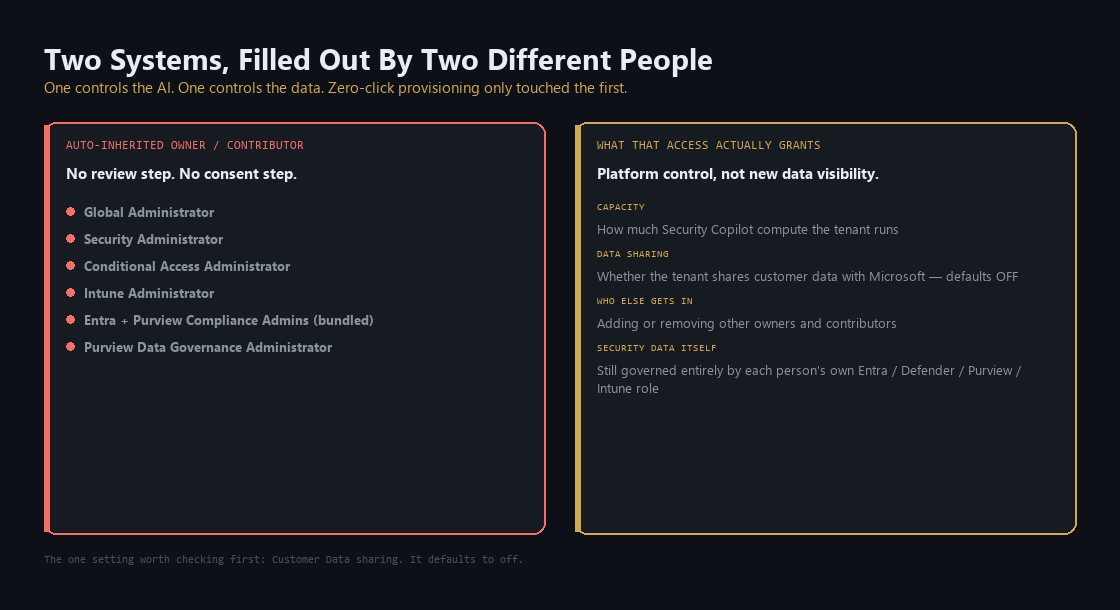
The one setting worth checking first is the data-sharing preference.
It defaults to off.
Nothing stops any of those eight roles from turning it on, and the person who does that may not have opened Security Copilot's own portal even once.
The telemetry it can't summarize if it isn't there
This is the badge's other half: which doors exist for it to open in the first place. It's the precondition every demo hides by construction, since a vendor's demo tenant has every product connected, every log flowing, every plugin turned on. Yours might not. If Defender doesn't cover a class of endpoints, if a Purview connector was never turned on, if Entra Conditional Access logging has gaps, Security Copilot has nothing to summarize in that gap. A confident, well-written answer that's missing a whole category of activity looks identical to a correct one. The product's ceiling is your telemetry coverage, not the model underneath it.
What it takes to run
The owner here should be security leadership, and the first task is a review, not a purchase. Open the Role assignment page inside the Security Copilot portal and look at who's actually listed as owner and contributor today. For most E5 and E7 tenants that page has never been opened, because nothing prompted anyone to open it.
Confirm the Customer Data sharing preference reflects an actual decision rather than whatever the default happened to be. Then map your telemetry coverage across Defender, Entra, Purview, and Intune before treating any Copilot answer as authoritative. A gap in what's connected and a gap in the model's competence produce the same symptom, and only one of them is fixable by checking a settings page.
Organizations without Microsoft 365 E5 or E7 don't get the automatic provisioning. Onboarding requires an Azure subscription and someone with a supported Entra or Purview role to provision at least one SCU, up to a maximum of 100 for initial setup. Microsoft's own guidance for an introductory exploration is 3 provisioned SCUs with overage left unlimited, tracked through the in-product usage dashboard.
What it costs, and is it worth it
Security Copilot is priced in SCUs. An SCU is priced like a rented slot of compute capacity, billed by the hour. The cost of one action moves with how much work it takes, a different meter than a flat per-query credit, and it matters once real dollars are attached to it below.
For Microsoft 365 E5 and E7 customers, Security Copilot is already paid for. The included capacity is 400 Security Compute Units (SCUs, the metered unit for Security Copilot usage) per month for every 1,000 licensed users, up to 10,000 SCUs a month, and it scales below the 1,000-user mark too: an organization with 400 licenses gets 160 SCUs a month.
400 SCUs included per month for every 1,000 licensed users on Microsoft 365 E5 or E7, capped at 10,000 a month.
Source: Microsoft Learn, Security Copilot inclusion FAQ
That allocation resets every month and doesn't roll over. Exceed it and Security Copilot throttles first; a pay-as-you-go overage at $6 per SCU becomes available as an option later, with 30 days' advance notice before it turns on. It isn't an automatic bill the way exceeding a data cap usually is.
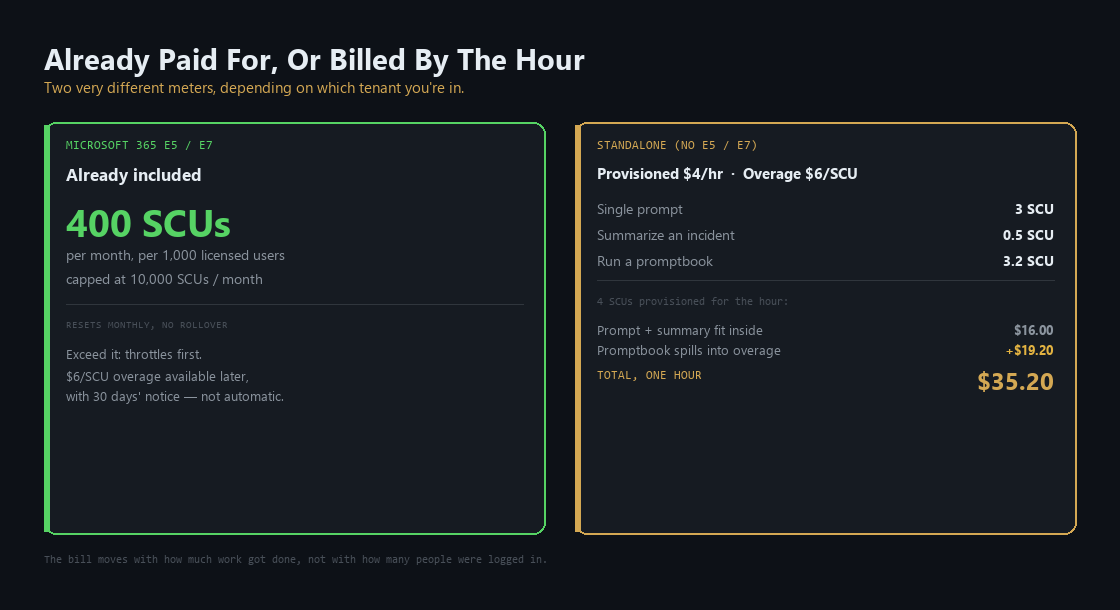
For organizations without E5 or E7, the meter has real dollar figures attached to it, and Microsoft's own pricing page names two of them:
- Provisioned SCU: $4 an hour
- Overage SCU: $6, billed only when used
The cost of one action varies by how much work it takes, not by a flat per-query rate. Microsoft's own worked example:
- Running a single prompt: 3 SCUs
- Summarizing an incident in Defender: 0.5 SCU
- Running a saved workflow, called a promptbook: another 3.2 SCUs
Provision 4 SCUs for the hour and the math plays out like this:
- The prompt and the incident summary fit inside the 4 provisioned SCUs: $16 for the hour
- The promptbook's 3.2 SCUs spill into overage: another $19.20
- Total for that one hour: $35.20
The bill moves with how much work got done, not with how many people were logged in.
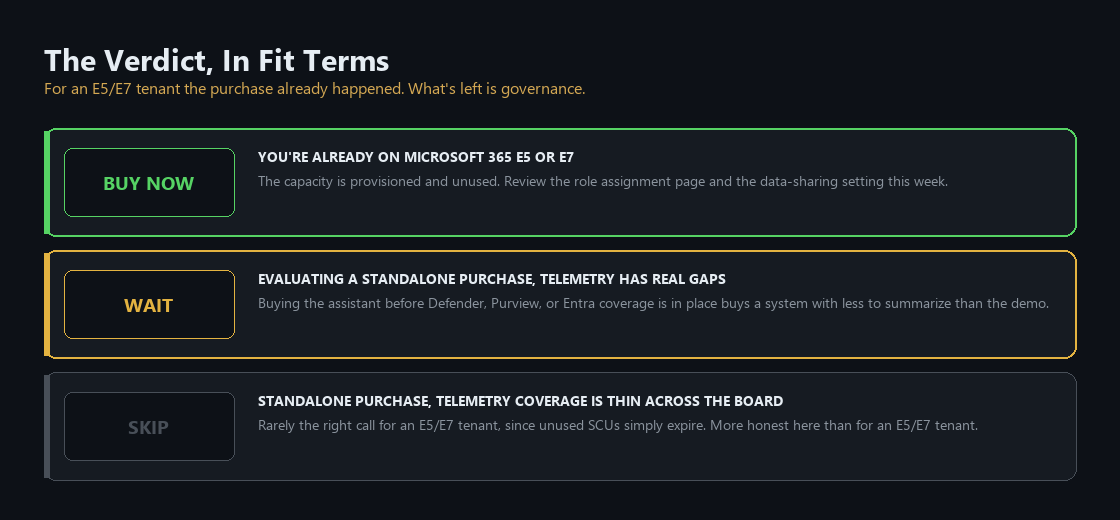
Buy now if you're already on E5 or E7. The purchasing decision was already made when you bought the license. What's left is governance, not procurement: review the role assignment page and the data-sharing setting this week rather than treating either as settled.
Wait if you're evaluating a standalone purchase and your Defender, Purview, or Entra coverage still has real gaps. Buying the assistant before the telemetry is in place buys you a system with less to summarize than the demo suggested.
Skip is rarely defensible for an E5 or E7 tenant, since the capacity is already provisioned and unused SCUs simply expire unused. It's a more honest answer for a standalone purchase where telemetry coverage is thin across the board, since the product has nothing to compress yet.
The Monday checklist
Four things a security lead can do this week, independent of any licensing decision.
- Open the Role assignment page in the Security Copilot portal and record who's actually listed as owner and contributor, not who you assumed holds those roles.
- Check the Customer Data sharing preference against what your organization actually decided, rather than whatever default shipped with activation.
- Compare last month's SCU usage to your included allocation before assuming the free capacity covers what your team is actually doing.
- Map telemetry coverage across Defender, Entra, Purview, and Intune before judging any answer as wrong. A coverage gap and a bad answer look the same from the chat window.
What comes next
Part 4 covers Dynamics 365, where Copilot crosses from suggesting text to writing directly into the system of record. The precondition changes too: instead of telemetry coverage, it's the quality of the CRM and ERP data underneath it, and Microsoft's own implementation checklist asks that question before anyone else does.
Product capabilities, licensing terms, and pricing in this post were verified against Microsoft's own documentation on 24 August 2026. Security Copilot's inclusion terms and default role list are governed by an active rollout and can change. Check before you sign anything.
Matthew Kruczek is Managing Director at EY, leading Microsoft domain initiatives within Digital Engineering. Connect with Matthew on LinkedIn to discuss how your organization should approach the Copilot portfolio.
References
- Microsoft Learn, "Privacy and data security in Microsoft Security Copilot," runs queries as the user, no elevated privileges beyond the user's own.
- Microsoft Learn, "Understand how Security Copilot is auto provisioned for eligible Microsoft 365 E5 and E7 customers," default roles inheriting owner and contributor access, autoprovisioning steps, workspace and capacity behavior.
- Microsoft Learn, "Learn about Security Copilot for Microsoft 365 E5 and E7 included customers," 400 SCUs per 1,000 licenses up to 10,000/month, no rollover, $6 USD per SCU overage option with 30-day notice, November 2025 rollout start, eligibility.
- Microsoft Learn, "Understand authentication in Microsoft Security Copilot," Security Copilot roles as platform-only access, distinct from Microsoft Entra and Azure RBAC, minimum two owners retained.
- Microsoft Learn, "Microsoft Security Copilot Security Compute Units and capacity," provisioned versus overage billing, hourly billing mechanics, non-E5/E7 capacity model.
- Microsoft Learn, "Onboarding to Security Copilot for non-Microsoft 365 E5 and E7 customers," minimum one SCU, maximum 100 for initial provisioning, recommended 3 SCUs with unlimited overage for exploration.
- Microsoft Learn, "Microsoft Security Copilot Frequently Asked Questions," SCU capacity calculator, pricing reference.
- Microsoft Learn, "What's new in Microsoft Security Copilot," Phishing Triage Agent public preview, Threat Intelligence Briefing Agent public preview.
- Microsoft Learn, "Prepare for Microsoft Copilot by comparing E3, E5, and E7 license features," Security Copilot included with Microsoft 365 E5 and E7 licenses.
- Microsoft Azure, "Microsoft Security Copilot pricing," provisioned SCU rate ($4/hour) and overage rate ($6/SCU), plus the worked billing example (3 SCUs for a prompt, 0.5 SCU for incident summarization, 3.2 SCUs for a promptbook).