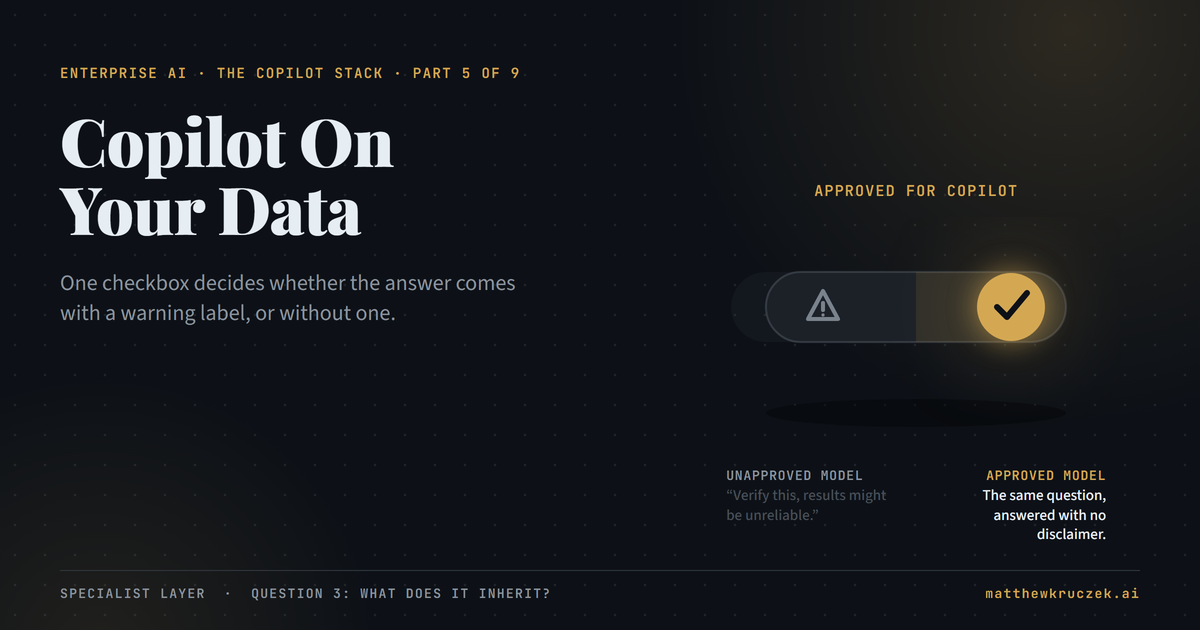
A Copilot answer can carry an invisible warning label. The label comes from one checkbox on the semantic model underneath the report, not from anything wrong with the question that was asked.
If you only have a minute:
- Fabric Copilot doesn't ship a model. It sits on top of whatever semantic model already exists, and a badly built model produces a hedged, low-confidence answer no matter how well the question was phrased.
- Microsoft built a real fix for this, not a disclaimer. A semantic model owner can mark it "Approved for Copilot." Every report built on that model, and every question asked of it, stops carrying the accuracy warning.
- Power BI Pro doesn't clear the floor Copilot requires. Copilot needs a paid Fabric capacity (F2 or above) or a Power BI Premium license (P1 or Premium Per User). An organization can be fully licensed on Pro seats for years and still have zero Copilot.
- The capacity path Microsoft has been selling for a decade is being phased out. Power BI Premium per-capacity licensing is retiring for new and renewing customers, replaced by Fabric's consumption-based F-SKUs, so today's capacity cost is a moving number.
- Copilot billing isn't a separate line item. It draws compute out of the same pooled capacity that runs everything else in that workspace, so a busy Copilot session can compete with a scheduled data refresh for the same resources.
- Copilot turns on for an entire capacity at once, not one workload at a time. Flip the switch and every attached Fabric workload gets Copilot simultaneously, whether or not each one is ready for it.
Part 4 covered Dynamics 365, where Copilot started writing to the system of record instead of just describing it. Part 5 moves to the other specialist product, and the shift here is different in kind. Fabric and Power BI Copilot doesn't act on anything. It answers questions. The entire question this post asks is why the same product gives confident answers to some people and hedged ones to others, using the exact same interface.
What it actually is
Copilot in Power BI is a natural-language layer over a semantic model, the structured, curated version of a company's data that a report is actually built on. Ask it a question in plain English, and it translates that question into the same kind of query a report visual would run, then explains the result back in a sentence.
That description undersells what it's built into. Copilot experiences now touch most of the Fabric platform: a chat pane inside an open report, a full-screen standalone agent that searches across items, an in-app experience inside a published app, plus workload-specific Copilots for Data Factory, Data Engineering, Data Science, Data Warehouse, and Real-Time Intelligence. Only the report-pane experience has reached general availability. Everything else, including the standalone full-screen agent, is still marked preview.
The one constant across every surface: none of them do any thinking of their own. They all read from a semantic model somebody else built, and the quality of that model is the whole story.
What job it does on an ordinary Tuesday
A finance analyst opens the standalone Copilot pane and asks, "Which region missed budget by the widest margin last quarter?" Against a semantic model nobody has ever prepared for AI use, Copilot returns a number, plus a note advising the analyst to double-check the result and contact the model's owner before relying on it. The number might be right. The warning shows up either way, because the model itself has never been marked ready.
Ask the identical question of a semantic model where someone has already renamed cryptic columns, standardized inconsistent values, and flipped one setting, and the warning disappears. Same interface, same wording, same underlying engine. The only thing that changed is a checkbox the report author flipped weeks earlier, on a screen the analyst asking the question has never seen and doesn't need to.
That checkbox is the entire product, compressed into one control.
What it inherits
The model, not the question, decides the confidence level
Microsoft calls the setting Approved for Copilot, and it lives on the semantic model, not on any individual report. A model author prepares the model, simplifying the schema, standardizing values, writing a handful of pre-verified answers, adding plain-language instructions for Copilot to follow, and then checks the box. Once that happens, every report and app built on that model inherits the approval automatically. There's no separate way to mark a report or dashboard approved on its own; the approval always traces back to the model underneath it.
Leave the box unchecked, and Copilot still answers, but it wraps the answer in a caution: results might be unreliable, and the reader should contact the model's owner. Workspace admins can go further and configure Copilot's search to surface only approved content in the first place, so an unprepared model doesn't show up in results at all. Tenant admins can set that as the org-wide default. One artifact carries every downstream Copilot experience's confidence level: the semantic model, not the report a person happens to be looking at.
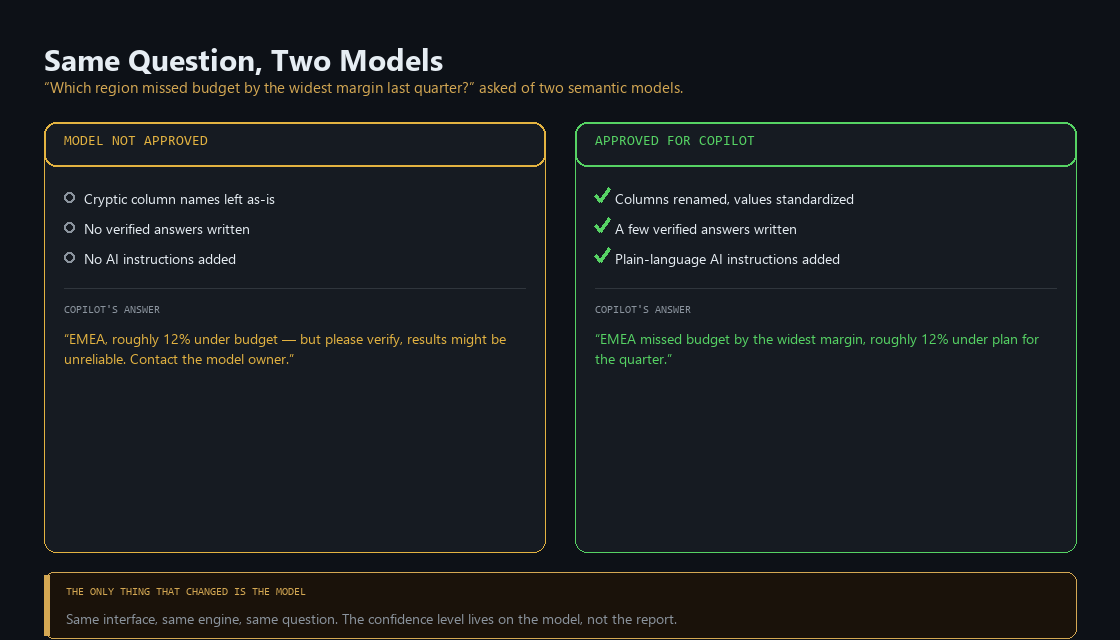
Instead of quietly returning a worse answer and letting the reader assume it's authoritative, Microsoft's own documentation is explicit that unapproved answers should be inspected carefully, and it puts a visible marker on them rather than a footnote. The friction routes accountability back to whoever owns the model, instead of leaving the person asking the question to guess whether they can trust what came back.
The capacity has to exist, and it has to be allowed to leave the country
Two smaller preconditions sit underneath the model one, and both are easy to miss until Copilot simply doesn't appear. First, an admin has to turn Copilot on for Fabric at the tenant level and confirm the capacity sits in a supported region. Second, if that capacity's home region falls outside the United States or the EU data boundary, Copilot is disabled by default, full stop, unless a tenant admin explicitly opts into a setting that allows data to be processed outside the tenant's own geographic or compliance boundary. For a lot of European and multinational tenants, that second setting is the actual gate, not the licensing tier.
What it costs, and is it worth it
Copilot has no standalone price. It rides on top of whichever license or capacity is already in place, and those come in two fundamentally different shapes: something billed per person, and something billed to the organization as a shared pool of computing power.
Billed per person:
- Power BI Pro: $14 per user per month, paid yearly, included free with Microsoft 365 E5 and Office 365 E5. This is the license that lets someone publish content to Fabric at all, but it does not include Copilot.
- Power BI Premium Per User (PPU): $24 per user per month, paid yearly (existing Pro, M365 E5, and Office 365 E5 holders can step up for an extra $14/month). This is the cheapest way to get one specific person Copilot access without the organization buying shared capacity.
Billed to the organization, as shared capacity:
- Fabric capacity: the current option, sold in sizes Microsoft labels F2, F4, F8, and on up to F64 and beyond, where a bigger number buys more computing power for everyone sharing it. It's billed like a rented server: by the hour, for as long as it runs. Using a representative rate from Microsoft's own documentation, the smallest size (F2) run continuously costs roughly $260 a month, before a single Copilot question is ever asked against it. Committing to a 1- or 3-year term instead of paying by the hour can cut that by roughly 40%.
- Power BI Premium capacity, the older version of the same idea: still active for existing customers, but Microsoft has stopped selling it to new customers and is retiring it for existing ones as their contracts come up for renewal. Anyone still pricing Copilot against this option is pricing against something Microsoft is actively phasing out.
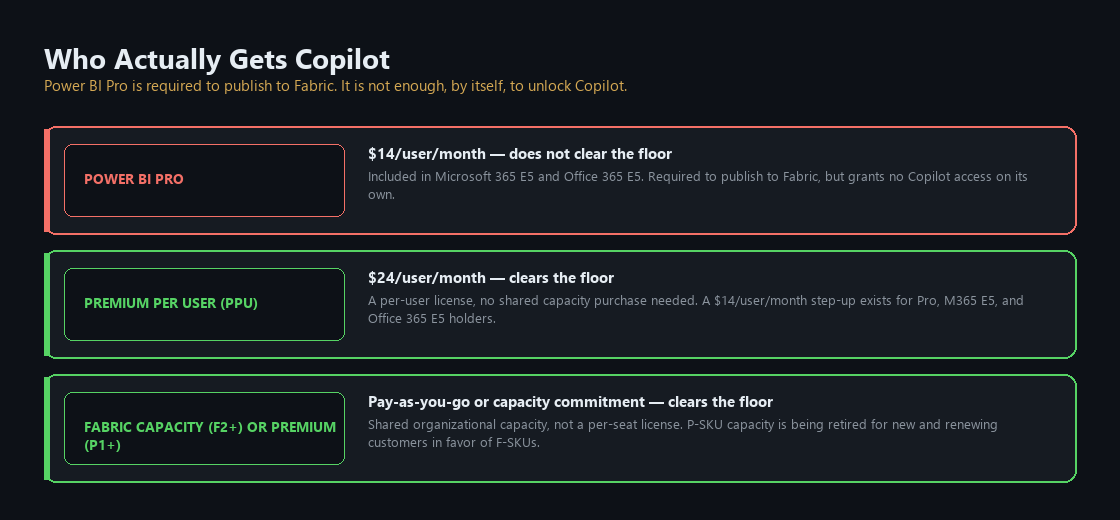
The organizations most likely to be surprised here are the ones already fully licensed. A company that put Power BI Pro in front of every analyst years ago, and never bought a Fabric or Premium capacity on top of it, has paid for Power BI the whole time and still has no path to Copilot until someone buys capacity separately. The per-seat spend and the Copilot spend are two different purchases, and the first one doesn't imply the second.
The verdict, in fit terms:
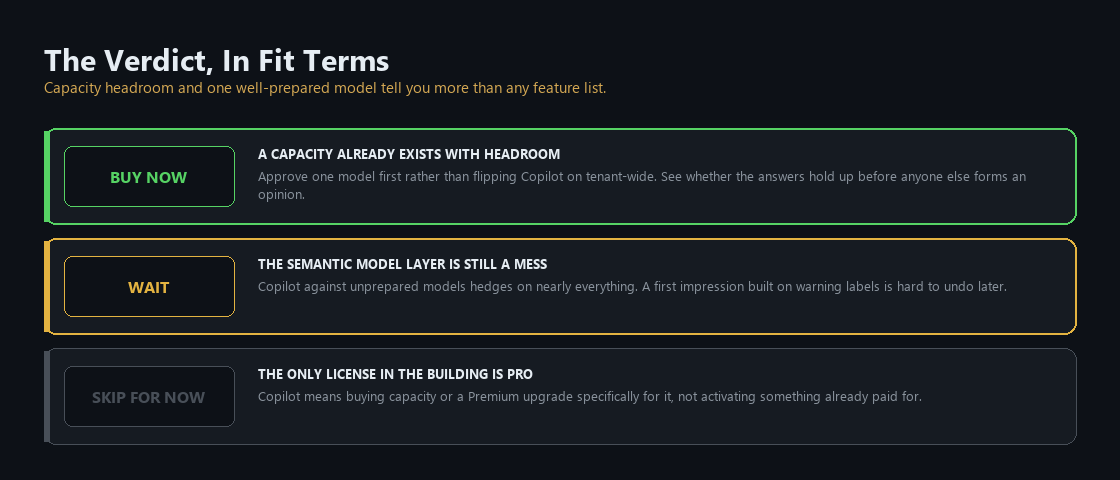
Buy now if there's already a Fabric or Premium capacity sitting in the tenant with headroom, and at least one semantic model worth the few hours it takes to prepare it properly. Approving that one model first, rather than flipping Copilot on tenant-wide, is the cheapest way to see whether the answers hold up before anyone else forms an opinion about the product from an unprepared model.
Wait if the semantic model layer is still a scatter of legacy datasets with inconsistent naming and no owner. Copilot against that layer will hedge on nearly everything it's asked, and a first impression built on constant warning labels is hard to undo later even after the models get fixed.
Skip capacity spend for now if the only Power BI license in the building is Pro. Buying Copilot access here means buying a capacity or a Premium upgrade specifically for it, not activating something already paid for, so it's worth confirming there's an actual analytical workload that benefits before adding a new capacity line to the bill.
What it takes to run
Copilot enables per capacity, not per workload. There's no setting to turn it on for reports but off for Data Factory. The moment an admin flips it on for a capacity, every workload attached to that capacity gets Copilot access at the same time. An organization that's confident about its Power BI models but hasn't touched Copilot governance for its data engineering pipelines doesn't get to sequence that rollout; both arrive together.
Whoever owns that capacity also owns the model-prep work, and it's simpler than it sounds. Getting a model ready for Copilot is really just good semantic-model practice, done more strictly than usual. Someone still has to rename cryptic columns, so CustNo becomes Customer Number. Fix inconsistent casing in status fields. Document refresh schedules. And set up row-level security correctly, since Copilot has no way to know on its own that two different users should see two different slices of the same data. None of it is Copilot-specific work. Copilot just can't ask a follow-up question when something is ambiguous, so a sloppy model shows up as a wrong answer instead of getting quietly ignored.
Capacity planning is the third job, and Copilot billing surprises people who assume it runs as its own meter. Copilot requests are classified as background jobs and draw Capacity Units from the same pool that runs every other Fabric workload on that capacity. A single Copilot request, using Microsoft's own worked example of a 2,000-token input and 500-token output, computes to roughly 6.67 CU-minutes, but because it's a background job, Fabric smooths that cost across a 24-hour window rather than charging it against a single moment. On an F64 capacity, that smoothing means over 13,000 Copilot requests can run in a day before capacity runs out. On a small F2 capacity shared with production report refreshes, a handful of heavy Copilot sessions can start competing with the workloads that were already running. Organizations planning to roll Copilot out broadly should isolate it on its own capacity rather than share one with production workloads, the same split-capacity approach Microsoft recommends for any resource-hungry addition to a shared Fabric environment.
The Monday checklist
Four things a BI lead or a Fabric capacity owner can check this week.
- Confirm whether Copilot is even reachable. Check the tenant's Fabric capacity tier (F2+ or P1+, or PPU per user) and the data-boundary setting if the capacity's home region sits outside the US or EU.
- Find the semantic models people actually query, and check how many are marked Approved for Copilot versus how many are quietly serving hedged answers nobody's flagged as a problem yet.
- Pick one high-traffic model and run it through the prep steps: clean column names, consistent values, a few verified answers, then flip the switch. Compare the before-and-after answers on the same question.
- Check whether Copilot consumption shares a capacity with anything time-sensitive, like a nightly refresh or a live dashboard, and consider a split-capacity approach before rolling Copilot out broadly.
What comes next
Part 6 crosses into the platform layer with Copilot Studio, where the reader stops being a buyer evaluating someone else's product and starts being the one who has to operate whatever gets built.
Product capabilities, licensing terms, and pricing in this post were verified against Microsoft's own documentation on 15 September 2026. Fabric capacity pricing varies by region and currency; the per-CU-hour figure cited here is Microsoft's own representative example, not a quote. Check current pricing before committing to a specific capacity tier.
Matthew Kruczek is Managing Director at EY, leading Microsoft domain initiatives within Digital Engineering. Connect with Matthew on LinkedIn to discuss how your organization should approach the Copilot portfolio.
References
- Microsoft Learn, "Prepare your data for AI to improve Copilot results (preview)," Approved for Copilot setting, friction-treatment removal, propagation timing.
- Microsoft Learn, "Copilot in Power BI tutorial: Prepare semantic model for AI," four-step preparation tutorial (schema, verified answers, AI instructions, approval).
- Microsoft Learn, "Standalone Copilot experience in Power BI (preview)," warnings on unapproved content.
- Microsoft Learn, "Find content with Power BI Copilot search," approval inheritance from model to report, Fabric data agents always counted as approved, workspace/tenant "approved only" settings.
- Microsoft Learn, "Copilot for Power BI overview," requirements at a glance (capacity, admin setting, region, sovereign clouds), GA versus preview status by surface, prompt-length limits.
- Microsoft Learn, "Fabric Copilot capacity," minimum F2/P1 SKU requirement, supported license modes (Pro, Trial, PPU, Premium capacity, Fabric capacity; Embedded excluded), one Copilot capacity per user.
- Microsoft Learn, "Optimize your semantic model for Copilot in Power BI," tenant enablement prerequisites, region restriction, data-boundary default-off setting outside US/EU, trial SKU exclusion.
- Microsoft Learn, "Use Copilot with semantic models," all-workloads-enable-together behavior for a capacity.
- Microsoft Learn, "Consumption rates and billing for Copilot in Fabric," background-job classification, 24-hour smoothing, worked CU-minute example, F64 daily request-volume example.
- Microsoft Learn, "How Copilot in Microsoft Fabric works," split-capacity strategy for isolating Copilot consumption from production workloads.
- Microsoft Learn, "Understand Microsoft Fabric licenses and capacity" and "Power BI Premium to Microsoft Fabric migration FAQ," P-SKU retirement, F-SKU as the replacement path, PPU unaffected by the retirement.
- Microsoft Learn, Fabric Data Factory pricing-scenario documentation, representative $0.18 per CU-hour rate for a typical Azure region.
- Microsoft, Power BI pricing page (microsoft.com/power-platform), Pro at $14/user/month, Premium Per User at $24/user/month, $14/user/month step-up add-on, Pro required to publish to Fabric.