If you only have a minute, here's what you need to know.
- Most engineers run AI coding agents with default settings. They're leaving 60-70% of the tool's capability on the table.
- An agent harness, the rules, hooks, skills, memory systems, and plugins wrapping your AI agent, determines output quality more than the model itself. Same model, same prompt, dramatically different results.
- My Claude Code harness uses 16 lifecycle hooks, 28 reusable skills, 5 plugins, 8 MCP server endpoints (5 aggregated through a single gateway), and a cross-project memory graph. Every layer is designed around one principle: optimize what enters the context window.
- Token comparisons show a 3-4x efficiency gain on research-heavy tasks and a 2x reduction in correction cycles on implementation tasks, compared to default configuration.
- The context window is the bottleneck for all agentic coding. You don't need my exact setup. But if you're running an AI coding agent without governance rules, memory persistence, and context optimization, you're paying for a sports car and driving it in first gear.
I wrote two weeks ago that agent harnesses need fewer layers, not more. That argument still stands. But "fewer layers" doesn't mean "no layers." It means the right layers.
Today I want to show you what that looks like in practice. Not a framework diagram. Not a theoretical architecture. My actual Claude Code configuration, the one I use every day to ship production code, monitor my social media, and manage a portfolio of 30+ projects.
This isn't a tutorial. It's an argument: your agent harness is the single highest-leverage investment you can make in AI-augmented engineering, and most teams haven't even started.
Why the context window is everything
Before I walk through my setup, I need to make the case for why all of this matters. The answer is three words: the context window.
Every AI coding agent operates within a fixed context window. That's the token budget holding system instructions, your conversation history, tool outputs, and the model's own reasoning. When that window fills up, the agent compacts: it summarizes and discards older context to make room. Every compaction loses conversational state. Every lost state means re-explanation, re-exploration, and re-orientation.
The default Claude Code experience treats the context window as a dumb pipe. Raw build logs? Dump them in. Five hundred lines of git log? Dump them in. The model's own correction attempts after generating code that doesn't match your standards? All of it goes in. Most sessions, 60-75% of the context window is consumed by information the model doesn't need in raw form.
This is the fundamental problem a harness solves. Every layer of a production harness exists to optimize what enters the context window. Front-load the right information, sandbox the noise, and eliminate the correction cycles that waste tokens on work the model should have gotten right the first time.
The model is powerful. The context window is finite. The harness bridges that gap.
What "default" actually looks like
When you install Claude Code and start a conversation, here's what happens:
The model receives your prompt. It has access to built-in tools: file read, file write, bash execution, web search. It knows nothing about your project conventions, your coding style, your team's architectural decisions, or what you worked on yesterday. Every session starts from zero.
This is like hiring a senior engineer and giving them no onboarding, no documentation, no code review standards, and no access to your team's Slack history. They're talented. They'll produce something. But they'll spend half their time asking questions you've already answered and writing code that doesn't match your patterns.
That's the default experience. And it's what 90% of Claude Code users are running right now.
Here's where their context window goes in a typical 2-hour session:
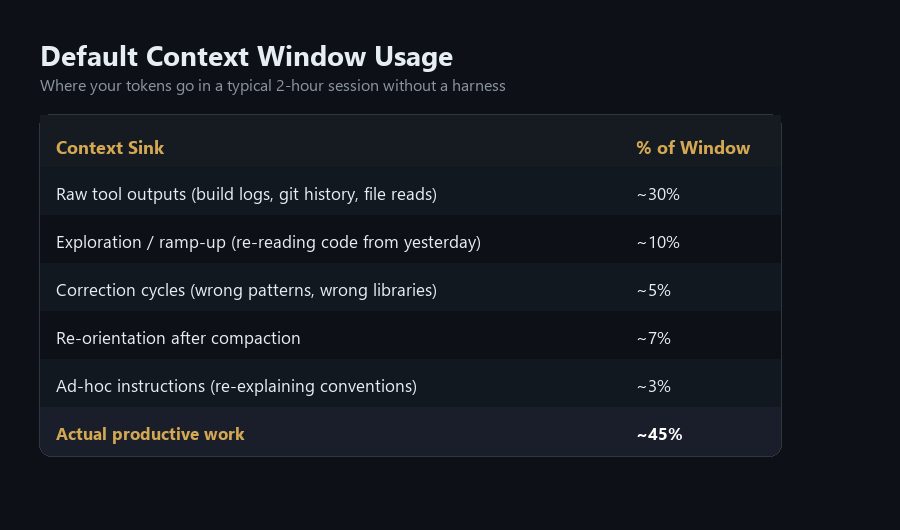
Less than half the context window is doing real work. The rest is overhead. That's the cost of having no harness.
The seven layers of a production harness
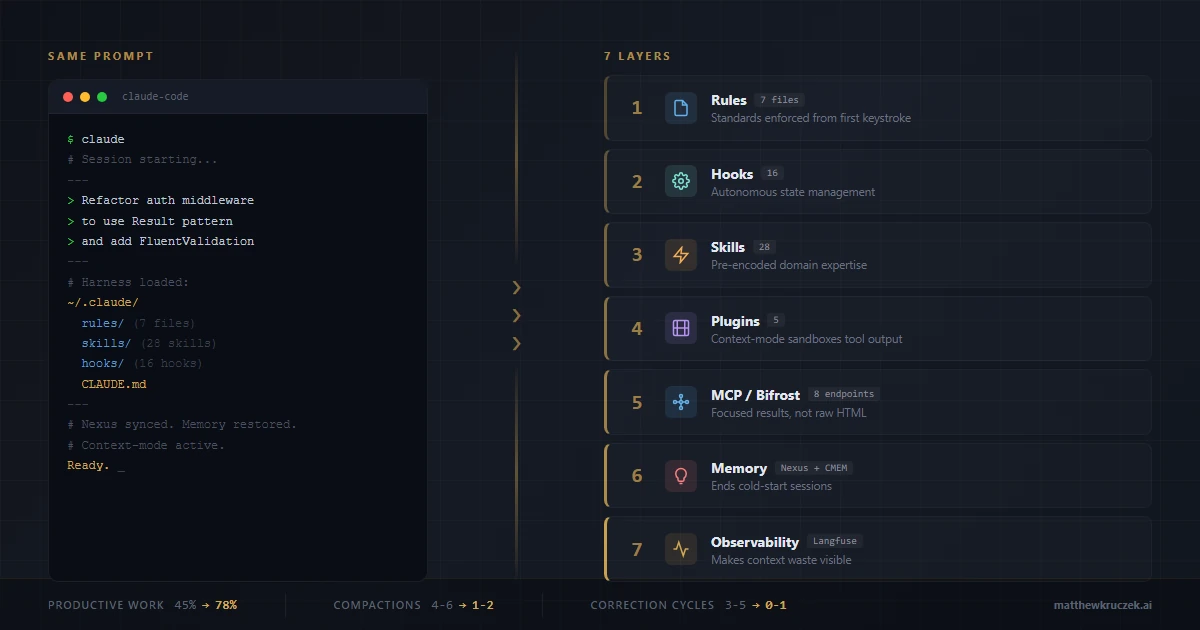
My harness has seven layers. Each one solves a specific problem that default configuration doesn't address, and each one is fundamentally about putting the right tokens into the context window while keeping the wrong ones out.
Layer 1: Governance rules (7 enforcement files)
The ~/.claude/rules/ directory contains seven markdown files that load into every conversation as system instructions. They encode:
- Coding style. Immutability patterns for TypeScript and C#. Spread operators, never mutate. Records and
withexpressions. Init-only properties. This isn't a preference; it's a requirement enforced before the first line of code is written. - Security checklist. No hardcoded secrets. FluentValidation on all DTOs. EF Core only for SQL (auto-parameterized). JWT validation with
ClockSkew=Zero. CSRF protection. Rate limiting on public endpoints. This runs as a pre-commit mental model, not an afterthought. - Agent orchestration. When to auto-spawn specialized subagents. Security-sensitive code triggers a security-reviewer. Build failures trigger a build-error-resolver. These aren't optional. They're wired into the rules.
- Testing standards. 80% coverage minimum. TDD when requested. xUnit with AAA pattern.
WebApplicationFactory<Program>for integration tests. - Performance guardrails. Context window management, research time limits, build troubleshooting protocols.
- Cross-project memory. When to query Nexus before asking me to re-explain something. When to check for existing decisions instead of making new ones.
- Common patterns. Privacy tags, skeleton project discovery, reusable architectural templates.
The cost: approximately 3,000 tokens of system context. The payoff: the model writes code that matches my standards on the first attempt. No correction cycles. No "actually, we use FluentValidation, not DataAnnotations." No "please don't use console.log."
Layer 2: Lifecycle hooks (16 hooks across 6 phases)
This is where a harness becomes autonomous. Claude Code supports hooks at six lifecycle phases: SessionStart, PreToolUse, PostToolUse, PreCompact, PostCompact, and Stop. I use all six.
SessionStart (3 hooks):
- Memory persistence restores my previous session's context: what I was working on, what's next, what decisions were made.
- Nexus syncs at session start. Nexus is a tool I built, a local-first knowledge graph that spans all my projects (more on this in Layer 6). It loads architectural decisions and dependency maps from all 30+ projects so the model doesn't start cold.
- Nexus session initialization sets up cross-project tracking for the current session.
PreToolUse (3 hooks):
- A skill switchboard routes file edits to the appropriate skill based on file type and project context.
- A strategic compact advisor monitors context usage and suggests compaction before I hit limits, preventing emergency compactions that lose more state.
- A push safety gate lists commits before any
git push, requiring review.
PostToolUse (3 hooks):
- Auto-formatting runs after every edit, eliminating style inconsistency.
- Observation logging records file paths and patterns to session memory.
- Nexus records architectural patterns and decisions for cross-project learning.
PreCompact & PostCompact (2 hooks):
- Before compaction: update MEMORY.md, save reusable patterns to lesson storage.
- After compaction: re-orient from MEMORY.md and task list so the conversation continues without interruption.
Stop (5 hooks):
- Clean MCP subprocess termination.
- Autonomy throttle (tracks how often Claude stops to check in; if it stops 3+ times in 5 minutes, it pauses and asks what I need instead of continuing on autopilot).
- Session end persistence.
- Nexus post-session analysis.
- Telemetry export for cost and token tracking.
The critical insight: these hooks run without my intervention. I don't think about memory persistence or auto-formatting or session telemetry. The harness handles it. Every cognitive cycle I'm not spending on housekeeping is a cycle I'm spending on the actual problem.
Layer 3: Skills (28 domain expertise modules)
This is the layer nobody talks about, and it might be the most underrated.
Claude Code skills are reusable prompt templates, slash commands that load pre-encoded domain expertise into the conversation on demand. Instead of writing a 500-token ad-hoc prompt explaining what you want, you invoke a skill that loads optimized, battle-tested instructions.
I maintain 28 skills across two tiers: 18 global skills available in every project, and 10 project-specific skills tailored to individual workflows.
Engineering skills:
/tdd-workflowenforces test-driven development: scaffold interfaces, write tests first, implement to pass, verify coverage. No ambiguity about the TDD process./security-reviewtriggers a comprehensive security audit for auth, payment, or identity code. Covers OWASP Top 10, secrets management, and attack surface analysis./shannonis an autonomous AI pentester. White-box security assessments with real exploit execution. Not theoretical. It finds actual vulnerabilities./llm-cost-optimizeraudits model selections across call sites and recommends cheaper alternatives by complexity tier. Pays for itself immediately./code-review,/build-fix,/refactor-cleanare post-implementation quality gates that catch issues before they compound.
Design and visualization skills:
/designcovers full brand identity, design tokens, UI styling, and logo generation with 55+ styles./slidescreates strategic HTML presentations with Chart.js, design tokens, and contextual slide strategies./visual-explainergenerates self-contained HTML pages that visually explain systems, code changes, and data./dashboard-creatorbuilds KPI metric cards, charts, and data visualizations as standalone HTML.
Planning and analysis skills:
/deep-plancreates sectionized implementation plans with multi-LLM review and stakeholder interviews./skepticis one I built myself (open source on GitHub). It runs critical analysis that pokes holes in plans, surfaces hidden complexity, and challenges assumptions before I commit to an approach. This one exists because AI agents have an agreeableness problem. You describe an idea and the model tells you it's brilliant, then helps you build it. Three days later you realize the approach had an obvious flaw that a skeptical colleague would have caught in five minutes./skepticis that colleague. It forces the model to argue against the plan before I greenlight it, and it's saved me from more bad architectural decisions than any other single tool in this harness./functional-designhandles end-to-end UI/UX creation from functional spec to working code.
The context window angle on skills is easy to miss. Without a skill, I type out detailed instructions every time, and the model still pulls its punches or misses nuance. That means follow-up corrections. With a skill, I type three words and the model loads 2,000 tokens of pre-optimized instructions. Comprehensive and correct from the first pass. Zero follow-up cycles. Skills convert ad-hoc prompting (variable quality, frequent corrections) into encoded expertise (consistent quality, zero corrections).
Layer 4: Plugins (5 active)
Claude Code's plugin ecosystem is young, but the right plugins dramatically extend capability:
- context-mode is the biggest context window optimizer in my stack. Instead of dumping raw command output (build logs, git history, file contents) directly into the context window, context-mode sandboxes execution and indexes the output in a local SQLite FTS5 database. Only summaries enter my conversation. A 500-line
git logthat would normally consume ~8,000 tokens? Indexed and searchable for a few hundred. A build failure with 200 lines of stack trace? Summarized to the 3 relevant error lines. Over a session, this compounds fast. - deep-plan provides sectionized implementation planning with multi-LLM review. Turns vague feature requests into structured, reviewable plans before a line of code is written.
- deep-implement runs TDD-oriented implementation from deep-plan sections. Writes tests first, implements to pass, then reviews.
- deep-project decomposes high-level project requirements into scoped planning units.
- code-simplifier handles post-implementation cleanup. Reviews changed code for reuse opportunities and unnecessary complexity.
Layer 5: MCP server aggregation (Bifrost)
MCP (Model Context Protocol) servers give Claude Code access to external tools, from APIs to documentation indexes to video analytics, through a standardized interface. The problem: each MCP server exposes its own set of tool definitions, and every tool definition consumes context window tokens. Run five MCP servers with 3-5 tools each, and you're spending thousands of tokens just on tool schemas before you've asked a single question.
Bifrost solves this by acting as an HTTP gateway that aggregates multiple MCP servers behind a single endpoint. It runs on a dedicated machine in my network and proxies requests to backend servers:
- context7 provides library documentation and code examples on demand. When Claude needs to reference a framework's API, it queries context7 instead of burning tokens on web searches or hallucinating method signatures. This is the one I lean on hardest. Accurate docs in the context window, not guesswork.
- sequential-thinking enables structured multi-step reasoning for complex architectural decisions. Forces the model to decompose a problem before committing to an approach, rather than jumping straight to code.
- github provides direct GitHub API access for PR management, issue tracking, and repository operations without leaving the conversation.
- firecrawl handles web scraping and content extraction. When I need to pull in a competitor's documentation, an API reference, or a technical article, firecrawl fetches and cleans it without me alt-tabbing to a browser.
- youtube provides video analytics and transcript extraction for competitive research and content analysis.
Two additional MCP servers run standalone: Nexus (cross-project memory graph) and CMEM (session memory). These stay direct because they're lightweight, local-only operations that don't benefit from gateway aggregation.
That's 8 MCP server endpoints total: 5 through Bifrost, 2 standalone, plus Bifrost itself. From the model's perspective, it sees 3 MCP connections. From my perspective, it's 3 processes to manage instead of 8.
The token savings come from two places. First, Bifrost consolidates all five servers behind one HTTP endpoint with one schema negotiation instead of five, reducing tool definition overhead in the context window. Second, and more importantly, these MCP servers return focused results instead of raw output. A context7 documentation query returns the exact function signature, parameters, and a usage example in 200-400 tokens. The alternative? A web search that dumps 3,000-6,000 tokens of HTML, ads, and irrelevant content into the context window. Firecrawl returns clean markdown instead of raw DOM. These MCP servers return what the model needs, not everything the source contains.
The bigger point: MCP servers are how you give an agent real-world reach without bloating its context. The harness controls what enters the context window, and Bifrost is the gatekeeper.
Layer 6: Cross-project memory (Nexus + CMEM)
This is the layer most people don't realize they're missing.
Nexus is a tool I built: a local-first, encrypted knowledge graph that spans all my projects. When I make an architectural decision in Project A, Nexus records it. When I'm working on Project B and face a similar decision, Nexus surfaces the prior art. It tracks:
- Architectural decisions and their rationale
- Code patterns and where they're used
- Cross-project dependencies and potential conflicts
- Infrastructure notes (SSH configs, deployment targets, service accounts)
CMEM (session memory) provides semantic search across past conversations. When I worked on a similar problem three weeks ago, CMEM surfaces the relevant context without me re-explaining it.
Without cross-project memory, every session starts cold. The model reads files it read yesterday, asks questions I've answered before, and explores architecture it's already mapped. With Nexus and CMEM, the model loads synced context at session start and picks up where we left off. The first task of every session starts productive instead of exploratory.
Layer 7: Observability (Langfuse + status line)
You can't optimize what you don't measure. My harness exports every session to Langfuse for cost and token tracking. A custom status line shows project name, model, context usage percentage, and remaining capacity in real time.
This might seem like a nice-to-have. It's not. When you can see that a research task consumed 45% of your context window on raw command output, you know exactly where to optimize. When you can compare token-per-task costs across sessions, you can make data-driven decisions about which plugins and rules are pulling their weight.
The status line is also a context window guardian. Seeing "Context: 72% | ~56K remaining" in real time changes how you work. You don't issue a massive git log --all when you can see you're at 70% capacity. You reach for context-mode's sandboxed execution instead. Observability turns unconscious context waste into conscious context management.
The token math
Here's what this looks like in practice. These are representative estimates from my Langfuse telemetry across typical coding sessions. Individual sessions vary, but the pattern is consistent.
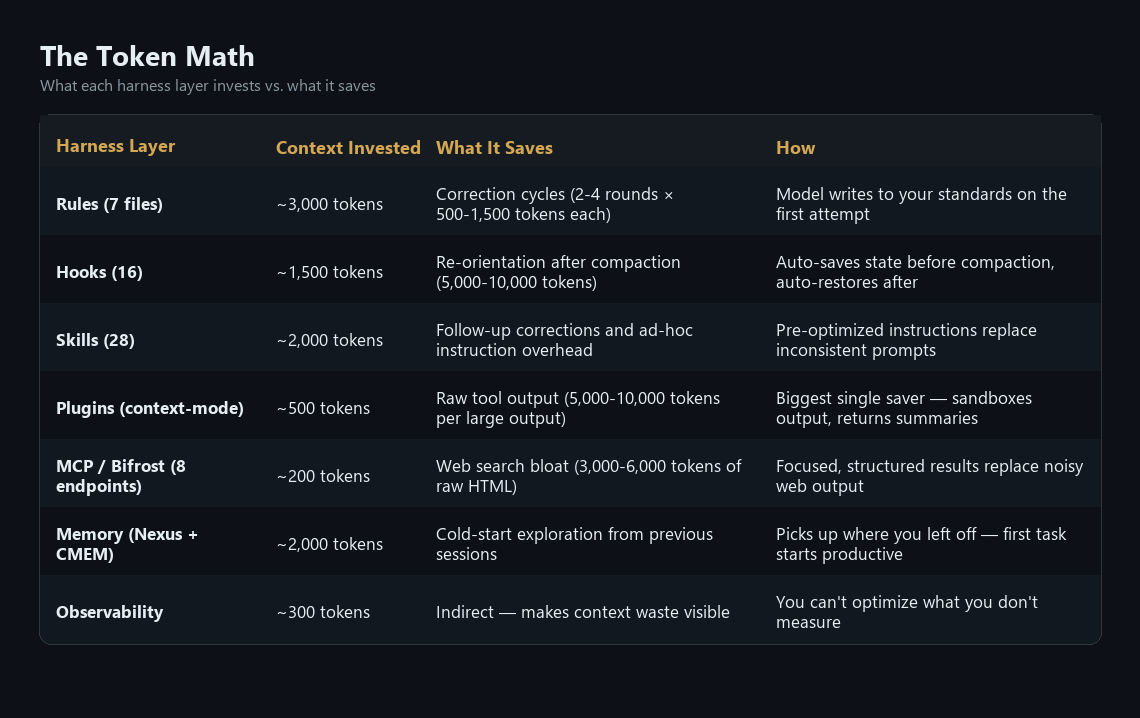
The combined effect: my sessions run at roughly 70-80% productive work ratio compared to the ~45% I see in default configurations. Compactions drop from 4-6 per session to 1-2. The model gets things right on the first attempt instead of the third. And I spend my time thinking about the actual problem instead of re-explaining my project.
Same prompt, different worlds
Let me make this concrete. Here's a real prompt I might give Claude Code:
"Refactor the authentication middleware to use the Result pattern and add FluentValidation"
Without a harness (default Claude Code):
- Claude asks clarifying questions (500 tokens): "What framework? What's the project structure? What's the Result pattern you're using?"
- Exploration phase (20,000 tokens): Reads 10-15 files to understand the codebase, architecture, existing patterns
- First implementation attempt (1,500 tokens): Writes code with
try/catchandDataAnnotations. Reasonable, but wrong for this codebase. - User correction (800 tokens): "We use FluentValidation, not DataAnnotations. And we use
Result<T>with error discriminated unions." - Second attempt (1,500 tokens): Closer, but uses mutable patterns and
console.logfor debugging - User correction (600 tokens): "Immutable only. No console.log. Use structured logging."
- Third attempt (1,500 tokens): Finally correct
- No security review triggered
- No tests written
Total: ~26,000 tokens. Three iterations. No tests. No security review.
With my harness:
- Rules pre-loaded: Claude already knows FluentValidation,
Result<T>, immutability requirements, structured logging, security standards - Nexus syncs (2,000 tokens): Project architecture, existing middleware patterns, and dependency graph loaded
- First implementation (1,500 tokens): Correct patterns from the start. Immutable, FluentValidation, Result<T>, structured logging.
- Security reviewer auto-spawns (rules detect auth code): Reviews for JWT validation, CSRF, token storage
- Auto-format runs: Code style consistent without manual review
- Build output sandboxed by context-mode: a few hundred tokens instead of thousands
Total: ~10,000 tokens. One iteration. Security reviewed. Standards enforced.
That's not a 10% improvement. That's a fundamentally different relationship with your context window.
Context window optimization: the throughline
If you've been counting, every layer of this harness optimizes the same scarce resource. That's not a coincidence. It's the design principle.
Rules front-load 3,000 tokens to prevent thousands more in correction cycles. Hooks automate state management that would otherwise consume context with manual "remember what we were doing" prompts. Skills convert variable-quality ad-hoc instructions into consistent, pre-optimized prompts. context-mode keeps raw tool output out of the window entirely. Bifrost routes queries to MCP servers that return focused results instead of raw HTML. Memory eliminates the cold-start exploration that consumes 10-20% of every default session. Observability makes all of this measurable so you know what's working.
The context window is the fundamental constraint of agentic coding. Every token spent on overhead is a token not spent on reasoning about your actual problem. Every unnecessary compaction is lost state and degraded continuity. Every correction cycle is the model doing the same work twice.
A harness doesn't make the model faster or smarter. It makes the context window deeper. And depth, the ability to sustain complex, multi-step reasoning without losing state, is what separates a coding assistant from a coding agent.
This is the new skill gap
Here's why this matters beyond my personal setup.
In every previous technology wave, the differentiator was knowledge of the technology itself. Know Java better than the next person, ship faster. Know Kubernetes better, deploy more reliably.
With AI coding agents, the technology is the same for everyone. We all have access to the same Claude, the same GPT, the same Gemini. The model isn't the differentiator.
The harness is.
The engineer who spends a week configuring governance rules, building skills for their recurring workflows, and optimizing context consumption will outperform the engineer with default settings for the next two years. Every session. Every task. Compounding daily.
The gap compounds in both speed and quality. The harnessed engineer gets security reviews triggered automatically. They get consistent code patterns without thinking about it. Their sessions don't break every 30 minutes from compaction. Their model has access to documentation through MCP tools instead of hallucinating API signatures from training data.
This is also why I keep arguing that the agent harness is the architecture. It's not infrastructure you bolt on after the fact. It's the primary lever for engineering productivity in an AI-native workflow.
What to do this week
You don't need 16 hooks, 28 skills, and 5 plugins on day one. Start with the highest-leverage layers, the ones that save the most context for the least effort:
Start with rules. Create ~/.claude/rules/coding-style.md and encode your team's three most-violated coding standards. This single file will eliminate the most common correction cycles immediately.
Add a CLAUDE.md to your project. Document your stack, your patterns, and your conventions. This is the project onboarding document you wish every new hire got on day one, except now your AI agent reads it every session. It's the highest-leverage single file in your entire repository.
Install context-mode. If you use Claude Code for any research or debugging, this plugin will be the single biggest context window optimizer. Raw command output flooding your context window is the #1 source of unnecessary compactions.
Build your first skill. Take the prompt you type most often, the one with specific formatting requirements, voice guidelines, or domain conventions, and turn it into a skill. It takes 30 minutes. It saves correction cycles forever.
Set up memory persistence. Even a simple PreCompact hook that prompts the model to update a MEMORY.md file will dramatically improve cross-session continuity. You shouldn't have to re-explain your project every conversation.
Measure everything. You can't optimize a context window you don't observe. Start tracking token consumption per task. The patterns will be obvious, and they'll tell you exactly which layer to build next.
The model is the engine. The context window is the fuel tank. The harness determines how far you go on every drop.
References
- Kruczek, M. "Agent Harnesses Don't Need More Layers. They Need Fewer." matthewkruczek.ai, March 17, 2026. matthewkruczek.ai
- Anthropic. "Claude Code: Hooks." Anthropic Documentation, 2026. docs.anthropic.com
- Anthropic. "Claude Code: CLAUDE.md." Anthropic Documentation, 2026. docs.anthropic.com
- mksglu. "Context-Mode Plugin for Claude Code." GitHub, 2026. github.com
- Kruczek, M. "Progressive Disclosure for MCP Servers." matthewkruczek.ai, 2026. matthewkruczek.ai
- Kruczek, M. "Context Engineering for Enterprise AI." matthewkruczek.ai, 2026. matthewkruczek.ai
- Anthropic. "Claude Code: Model Context Protocol." Anthropic Documentation, 2026. docs.anthropic.com
- Bifrost. "MCP Gateway for Claude Code." GitHub, 2026. github.com
- Anthropic. "Claude Code: Skills." Anthropic Documentation, 2026. docs.anthropic.com
This article is part of "The Agent-First Enterprise" series exploring how organizations can transform their operations around AI agent capabilities. Connect with me on LinkedIn or Substack to discuss agent harness architecture and context optimization for your engineering organization.